Redragon EISA K768 Review: A Budget 100 Key Keyboard That Actually Finds A Sound Profile

⌨️ Redragon EISA K768: https://amzn.to/4dySffj
🛒 Official Redragon Store: https://redragonshop.com/products/eisa-k768?variant=48049119101150
Redragon has a naming problem. I am just going to say it. The Redragon EISA K768 sounds less like a keyboard and more like something you would find printed on the bottom of a Wi-Fi router. It does not exactly roll off the tongue. EISA K768. ISA 100. K768. Whatever we are calling it, Redragon really needs to give these things more memorable names. Call it the Dragon 100. Call it the Cocoa Dragon. Call it something.
Thankfully, once you get past the name, the actual keyboard is much easier to understand. This is a 96% wireless mechanical keyboard with a number pad, MOA profile keycaps, Yolk linear switches, a knob, RGB lighting, tri-mode connectivity, Mac and Windows support, and a price that usually sits somewhere in the affordable keyboard zone. On Redragon’s own site, it was listed at $64.99 and discounted to $51.99 with a coupon at the time I checked. Amazon pricing can bounce around as well, so like most Redragon products, you should check both Amazon and the official store before buying.
This is not a luxury keyboard. It is not trying to be an aluminum custom build. It is plastic, lightweight, and clearly built around hitting a lower price point. But that does not automatically make it bad. In fact, the Redragon EISA K768 is one of those boards where the overall package makes more sense once you hear it. It has a clacky sound profile with a bit of thock underneath, and while it does have some hollow qualities, the sound comes together better than I expected.
For a budget 100 key keyboard, that is the real story here. It is not perfect, but it works.
Design And Layout
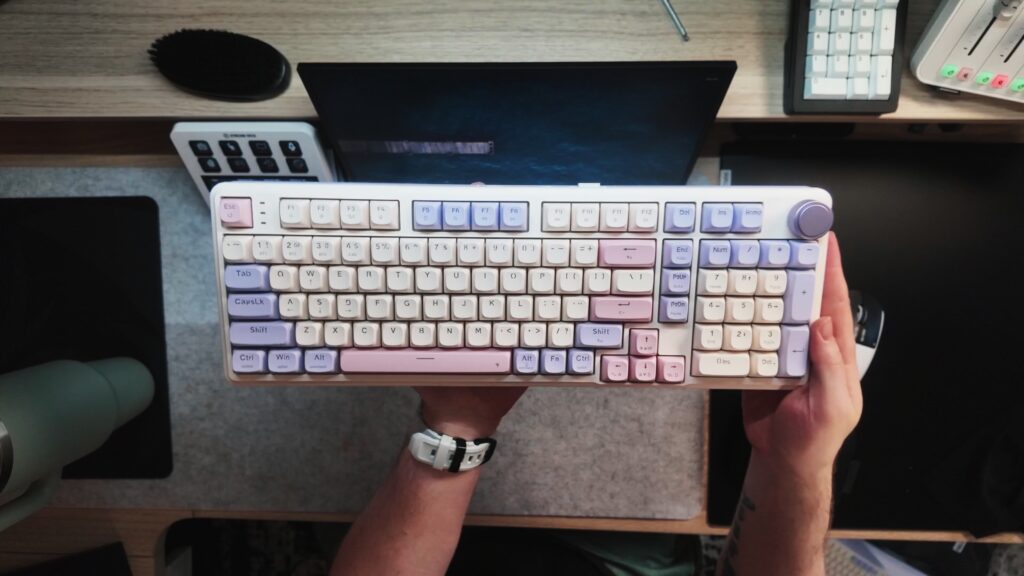
The Redragon EISA K768 uses a 96% layout, which means you are getting most of the functionality of a full-size keyboard, including a number pad, but in a more compact footprint. If you are someone who still uses a numpad for work, editing, spreadsheets, games, macros, or general productivity, this layout makes a lot of sense. You get the useful parts of a full-size keyboard without the board stretching halfway across your desk.
This is especially nice because the keyboard market has been obsessed with smaller layouts for years. Everything is 60%, 65%, 75%, or TKL. Those are great layouts for a lot of people, but not everyone wants to give up a number pad. The EISA K768 gives you a more practical daily driver format while still feeling more compact than a traditional full-size office keyboard.
The colorway I tested has a soft cream and pink look that Redragon calls Retro Cocoa. I genuinely like it. It is not the usual black gamer rectangle with aggressive legends and RGB blasting out of every corner. It has personality. It looks softer, warmer, and more desk-friendly than I expected from Redragon.
The MOA profile keycaps are large, rounded, and visually distinctive. If you like that taller, sculpted, almost chunky keycap style, this keyboard leans into it hard. It gives the board a playful look and a softer typing feel. The issue is not the shape. The issue is how much information is printed on the keycaps.
There is a lot going on visually. You have Bluetooth labels, 2.4GHz labels, Mac and Windows legends, function layer markings, arrows, shortcuts, and alternate commands all competing for your attention. The base colorway is attractive, and the keycap shape is fun, but the legends make the board feel busier than it needs to be. I would have preferred cleaner keycaps with optional Mac and Windows replacement caps in the box.
The board wants to look clean and cozy, but the legends make it feel like it is trying to explain itself at all times.
Build Quality
The Redragon EISA K768 is plastic. There is no way around that. The case is plastic, the frame is lightweight, and the board does not have the dense, premium feel of a heavy custom keyboard. But that is also not what this is.
For the price range, the build is acceptable. It feels like a budget wireless mechanical keyboard, but not in a bad way. It is light enough to move around, easy to reposition, and practical for someone who wants a daily keyboard without spending custom keyboard money.
The rear feet are one weak point. They technically have adjustable levels, but they do not lock firmly enough. If you push the keyboard forward or backward on your desk, the feet can collapse. This is not unique to Redragon. I see this constantly on budget boards, and even on some more expensive keyboards. Still, it is worth mentioning because it can get annoying if you move your keyboard around a lot.
The knob, however, is better than expected. It feels metal or at least metal-like, has a tactile click, and has enough texture when rotating to feel intentional. Budget keyboard knobs can feel cheap fast. This one is actually pleasant to use.
Connectivity And Features
The EISA K768 supports wired mode, 2.4GHz wireless, and Bluetooth. It also has a built-in dongle storage slot on the back, which is always appreciated. Even better, the dongle clicks into place instead of loosely sitting there waiting to disappear forever.
There is also a physical switch for Mac and Windows, plus a mode selector for 2.4GHz, Bluetooth, and wired use. That is the kind of practical layout I like seeing. You do not have to dig through software just to change basic connection modes.
The keyboard also includes Mac and Windows legends on the keycaps. Functionally, that is useful. Visually, as mentioned earlier, it adds to the clutter.
The battery is 8000mAh, which is large enough to feel meaningful on a wireless keyboard. I joked that they probably could have put a 10,000mAh battery in here, but 8000mAh is still a solid number for a board in this category. One neat feature is that you can check the battery level using a key shortcut, and the LEDs will show the remaining battery percentage visually across the keys. That is a small but useful touch.
It also has RGB lighting. The LEDs are north-facing, which will be a dealbreaker for some keyboard enthusiasts who prefer south-facing switches for compatibility and shine-through reasons. But for the average user, especially someone who likes visible RGB, the lighting looks bright and clear. With these keycaps and this colorway, the lighting adds a nice glow without completely taking over the board.
Switches And Typing Feel
The version I tested uses Redragon’s Yolk linear switches. These are not silent switches, and they are not deep thock monsters. They sit more in the clacky category, but there is a little bit of roundness underneath the sound. I called it a clacky thock because it does not live completely in one lane.
The typing feel is light, smooth enough, and pleasant. The board has a gasket design, which gives the typing experience a little bit of bounce. You are not getting the refined flex or softness of a more expensive custom build, but there is enough cushioning here that it does not feel harsh or dead.
The sound profile is what surprised me most. Budget keyboards often fail in one of two ways. Either they sound thin and plasticky, or they try way too hard to be deep and thocky but end up sounding muddy and uneven. The Redragon EISA K768 does not fall completely into either trap. It sounds clacky, a bit hollow, and definitely budget in places, but the overall tone is enjoyable.
The spacebar is a little hollow, and I do think some additional foam inside the spacebar could help tame that resonance. But it also blends with the rest of the keyboard better than I expected. That is important. A lot of keyboards have a spacebar that sounds like it came from a different product entirely. You will type along, everything sounds fine, then the spacebar suddenly sounds like someone slapped an empty storage bin.
That does not happen here. The spacebar has its own tone, but it fits the rhythm of the board. It sounds good on both sides too, which means the stabilizer tuning is better than I expected for the price.
Sound Profile

The Redragon EISA K768 is for people who like clack. If you are chasing a deep, creamy, muted, thock-heavy sound profile, this is not really that board. This has more high-end energy. It has that sharper clacky character, but with enough body underneath to avoid sounding terrible.
It is not a quiet keyboard. If you are in an office or shared space, this may not be the best choice unless the people around you are already used to mechanical keyboard noise. It is not obnoxiously loud, but it has presence.
On microphone, especially with a strong audio setup, it will sound more intense than it does in person. That is always worth remembering with keyboard sound tests. A close microphone makes everything sound bigger, louder, and more dramatic. In person, the EISA K768 is still clacky, but not as extreme as a sound test may make it seem.
The biggest compliment I can give it is that the sound profile feels coherent. It may not be premium, but it feels like the board has a sound identity. It is not just random hollow plastic noises. It has a personality.
Software
The EISA K768 uses Redragon’s software. It exists. It works. You can remap keys, set macros, change functions, and do the usual keyboard customization tasks. It is not the kind of software experience that makes me want to spend an hour customizing every layer for fun, but it does what it needs to do.
At this point, most budget keyboard software falls into the same category. You download it, you make the changes you need, and then you hopefully do not have to open it again very often. Redragon’s software is not my favorite part of the product, but it is functional.
Pros
- Affordable price, especially when on sale
- 96% layout gives you a number pad without taking up full-size keyboard space
- Pleasant clacky sound profile
- Spacebar blends better with the rest of the board than expected
- Yolk linear switches feel nice for casual typing
- MOA keycaps give the keyboard a fun personality
- Retro Cocoa colorway looks good
- Tri-mode connectivity with wired, Bluetooth, and 2.4GHz
- Built-in wireless dongle storage
- Mac and Windows support
- Large 8000mAh battery
- Useful battery indicator shortcut
- Knob feels better than expected for the price
- Bright RGB lighting
- Comes with extra switches
- Good value for someone who wants an affordable wireless mechanical keyboard with a numpad
Cons
- Redragon’s naming is still confusing
- Plastic case feels lightweight
- Rear feet do not lock firmly enough
- Keycap legends are too visually busy
- North-facing RGB may bother enthusiasts
- Spacebar has some hollowness
- Software is functional but not exciting
- Not for people who want a deep thocky sound
- Included cable is basic
- The board can feel visually cluttered despite the nice colorway
Who Is This Keyboard For?
The Redragon EISA K768 makes the most sense for someone who wants an affordable mechanical keyboard with a number pad, wireless connectivity, and a more fun visual design than a plain black office keyboard. It is also a good fit if you like clacky keyboards and want something that sounds lively without getting into expensive custom keyboard territory.
This is not the keyboard I would recommend to someone chasing the deepest sound profile possible. It is also not the board I would point an enthusiast toward if they want premium materials, VIA support, south-facing switches, or a refined custom typing feel.
But for a normal user who wants a good-looking keyboard, useful layout, wireless modes, RGB, a knob, and a solid typing sound, this is a pretty good package.
It also works well for people who are tired of tiny keyboards. If you want the number pad back, but you do not want a massive full-size board, this 96% layout is a nice middle ground.
Final Thoughts
The Redragon EISA K768 is better than its name. That is the simplest way to put it.
It is a budget keyboard, and you can feel that in the plastic case, the lightweight build, the basic accessories, and the slightly hollow sound in some areas. But it also has a lot going for it. The layout is practical, the colorway is genuinely nice, the knob feels good, the wireless options are useful, the battery is large, and the sound profile is more enjoyable than I expected.
The biggest issue is the visual clutter on the keycaps. Redragon had a really nice-looking board here, and then loaded the keycaps with so many extra legends that it becomes a little messy. It is still usable, and some people may even prefer having all those function labels visible, but I think the board would look much cleaner with simplified legends and optional replacement keycaps.
Sound-wise, this is a pleasant clacky keyboard. It is not trying to be the deepest thock machine on the market, and that is fine. Not every keyboard needs to chase the same sound. This one has a brighter, more energetic personality, and for the price, it works.
If you are looking for an affordable 96% wireless mechanical keyboard with a number pad, MOA keycaps, RGB, a knob, and a surprisingly decent stock sound, the Redragon EISA K768 is worth checking out.