Chosfox INIT40 review: This tiny 40% keyboard has come a long way

Affiliate link: Chosfox INIT40
Disclosure: Chosfox provided the INIT40 for review. Links in this article may be affiliate links, which means Crafting Worlds may earn a commission if you purchase through them. That does not change the price you pay or influence my opinion of the product.
I have reviewed a few Chosfox keyboards over the years, and if you go back far enough, I was not particularly kind to some of them. The ideas were always interesting because Chosfox clearly enjoys making very small, very weird keyboards, but the execution could sometimes feel like the idea got further along than the typing experience did. Some of their earlier compact boards were difficult for me to type on, especially once ortholinear layouts entered the equation.
The Chosfox INIT40 feels different. Not because Chosfox suddenly abandoned the strange little keyboard niche. Quite the opposite. They seem to have gotten much better at it.
“INIT40” apparently comes from “initialization” or “initial attempt,” which I found funny because there is something refreshingly direct about naming a product like, “Well, here’s our first shot at this.” The funny part is that I don’t think they need to apologize for this attempt. The INIT40 is easily one of the most complete Chosfox boards I’ve used, and more importantly, it fixes several of the problems that kept me from enjoying some of their earlier designs.
Also, Stacato helped with the review by playing dead for most of it, so obviously the testing methodology was extremely rigorous.
Tiny, but it doesn’t feel cheap
The first thing that surprised me was how substantial the INIT40 feels in your hands. This is a tiny keyboard, but it isn’t some lightweight plastic thing that feels like it belongs next to a tablet at a hotel check-in kiosk. Chosfox used an aluminum chassis, and the board has enough weight and rigidity that it immediately feels more expensive than its size would suggest.
There is also a surprising amount of detail in places where Chosfox could have saved money and nobody would have complained. The underside has proper branding and machining, the edges are finished nicely, and there are little openings around the case where the RGB can escape. You are probably never going to sit there admiring the underside of your keyboard, but I like when a company bothers to finish the parts you normally don’t see. It makes the whole thing feel less like a novelty.
The rubber feet deserve an oddly specific compliment too. They GRIP. When I tried moving the keyboard during the review, I basically moved everything underneath it instead. With something this small, that is exactly what I want because tiny keyboards can otherwise have a tendency to wander around the desk every time you get enthusiastic with the spacebar.
Chosfox also built a five-degree typing angle directly into the chassis. It isn’t dramatic, but it gives the board enough angle that it doesn’t feel completely flat. For the kind of work I think this keyboard is best suited for, that is probably the right choice. You can throw it onto almost any desk, start typing, and not have to fiddle around with feet or stands.
Chosfox gives you a ridiculous amount of stuff
The INIT40 comes in one of Chosfox’s little carrying cases, and I still love these things. They make more sense here than they do with almost any other keyboard because the INIT40 is genuinely small enough to travel with.
Inside the case you get the keyboard, wireless dongle, braided USB cable, documentation, extra keycaps for Mac and Windows layouts, and a few alternate keys. Then you get the Chosfox stuff that doesn’t need to exist but makes the product more fun.
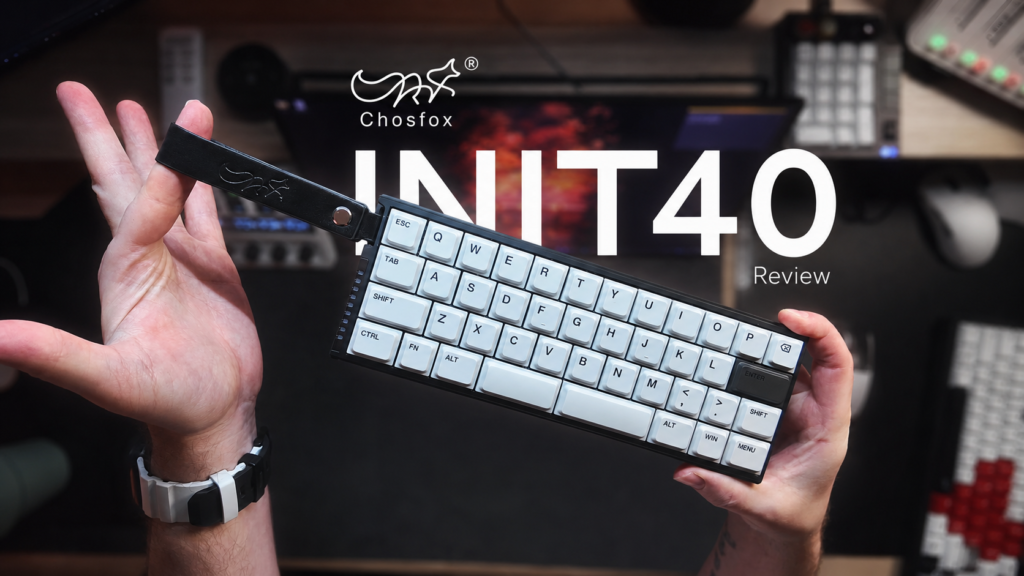
There is a leather wrist strap attached to the board with the Chosfox fox logo embossed into it. Do I need a wrist strap on a mechanical keyboard? No. Am I glad it exists? Kind of, yeah. It’s adorable.
Then there is the fox keycap.
I love the fox keycap.
Chosfox, if you’re reading this, just put the fox keycap in everything from now on. I don’t care if it’s a full-size keyboard. I don’t care if it makes no sense. Give me the fox.
The accessory package also changes how I feel about the asking price. At around the $100 range depending on configuration, the INIT40 is obviously not cheap if your only metric is “how many physical keys did I receive for my money?” But that is also the wrong way to judge something like this. You’re buying a very niche aluminum low-profile mechanical keyboard with wireless connectivity, custom firmware support, a carrying case, good accessories, and a layout that not many mainstream manufacturers are even attempting.
The staggered layout is the real improvement
This is the biggest reason the INIT40 works for me.
Some earlier Chosfox keyboards I tested used ortholinear layouts, where the keys sit in straight columns instead of the staggered arrangement most people have been typing on their entire lives. I know there are people who absolutely love ortholinear keyboards. I am happy for you. My brain wants nothing to do with them.
I already hunt and peck when I type. I’m not going to pretend I have some elegant ten-finger typing technique that becomes magically optimized when the keys line up. If anything, ortholinear makes my already questionable typing style worse because my muscle memory reaches for keys that are no longer where I expect them.
The INIT40 brings back a normal row stagger, and that instantly makes the whole thing easier to use. I can sit down and type without relearning where the alphabet lives. There is still a learning curve because this is a 40% keyboard and obviously a lot of keys are gone, but at least the keys that remain are where my fingers expect them to be.
That makes the INIT40 much more approachable than I expected. If you’ve looked at 40% keyboards before and thought, “That seems cool, but I am absolutely not learning some alien typing layout,” this is a much less intimidating way into the format.
The split spacebar is another design decision I normally complain about, and somehow Chosfox got me there too. One side is larger, the other smaller, and the placement works with where my thumb naturally lands. I never found myself constantly smacking the gap between the two bars, which has happened to me on other split-spacebar designs.
I don’t suddenly love every split spacebar on earth. I like this one.
The typing experience is much better than older Chosfox boards
This is where I really started noticing how much Chosfox has improved.
The unit I tested uses the Black Cloud switches, and I like them quite a bit for typing. They’re not the super-light linear switch I usually gravitate toward for gaming, but I also wouldn’t personally use this keyboard for serious gaming. For writing and normal desktop work, the weight feels good and controlled.
Chosfox offers several switch choices, including Black Cloud, White Rain, Deep Sea Linear and Deep Sea Tactile options depending on the configuration. There is also a silent option for people who are specifically looking at this as a shared-office or coffee-shop keyboard. Personally, if I were choosing a linear version, I’d still love to see something around 40 grams eventually because I am a sucker for ridiculously light linears.
The keycaps are low profile as well, and Chosfox refers to them as LAC keycaps. I hadn’t really encountered that terminology before this board, but the easiest way I can describe the feel is something closer to a low-profile Cherry-style shape than a typical laptop keycap. They don’t have that mushy scissor-switch feeling that makes me immediately want to plug in another keyboard.
That’s important because I think the entire argument for this keyboard is basically: “I have a laptop, but I don’t want to type on the laptop keyboard.”
And for that? Yeah. I get it.
The acoustics are genuinely good

This is probably the biggest technical improvement I’ve seen from Chosfox.
There is a lot going on inside this tiny case. Chosfox is using multiple layers of foam and PET material along with silicone gasket elements, and you can hear that work in the finished board. The stabilizers don’t rattle all over the place, the larger keys don’t suddenly sound like they came from another keyboard, and there isn’t a big hollow cavity making everything sound thin.
Small low-profile keyboards can sound pretty terrible if the case isn’t tuned well. There isn’t much physical volume to work with, so bad resonance becomes obvious quickly.
The INIT40 doesn’t have that problem.
It sounds controlled and surprisingly full for something this small. I don’t want to turn that into the usual keyboard-review nonsense where every remotely pleasant keyboard suddenly becomes “THOCK KING 2026,” because it isn’t trying to imitate some enormous custom board. It’s a low-profile 40% keyboard. Within that context, Chosfox did a very good job.
The sound test was actually one of the points where I stopped thinking of this as “that cute tiny Chosfox keyboard” and started thinking of it as a legitimately well-built mechanical keyboard that happens to be tiny.
That’s a pretty big change from my experience with some of their older boards.
RGB that isn’t trying to attack your eyeballs
There is RGB in the INIT40, although the stock keycaps hide most of it. You can see some lighting between the keys, but where it looks best is around the little side accents and openings in the chassis.
It is surprisingly tasteful.
That sentence hurts me to write because if you watch my keyboard reviews, you already know I am not the person advocating for subtle RGB. I want the keyboard to look like a spaceship has landed on my desk.
But the restrained lighting works with this design. The INIT40 is very clean and minimal, so the little RGB accents around the aluminum case give it some personality without turning the whole thing into a rainbow rectangle.
That said, if Chosfox gave me a shine-through keycap option, I would absolutely take it. That is probably the one change I’d make to the current version. Give normal people the clean keycaps and give RGB psychopaths like me another set.
Problem solved.
VIAL makes sense here
The INIT40 supports VIAL, which is an open-source fork of VIA with deeper customization options.
This is also one of those rare keyboards where software customization isn’t just an enthusiast feature you mess with once and forget about. On a 40% layout, layers are part of daily life. There simply aren’t enough physical keys for everything you might want to do, so your secondary layers matter.
That means you can decide where your missing functions live rather than accepting whatever arrangement Chosfox thinks makes sense. Someone using the INIT40 primarily for writing may want one setup, while someone doing spreadsheet work or navigating browser shortcuts may build something completely different.
I have spent a lot more time around VIA than VIAL, so I’m still curious where people fall on that argument. I’ve noticed VIAL appearing more often lately, and a keyboard like this is probably one of the better reasons to actually explore what it can do.
If you’re already deep into 40% keyboards, you probably have very strong opinions about this. Feel free to fight about VIA versus VIAL in the comments while the rest of us pretend we know what’s happening.
Wireless, wired, Mac, Windows… somehow they packed all of it in
The connectivity is another reason the Chosfox INIT40 makes more sense to me as a travel keyboard than a novelty board.
You get tri-mode connectivity, so you can use the keyboard wired, over 2.4 GHz wireless, or through Bluetooth. There is an 1800 mAh battery inside, and Chosfox includes the 2.4 GHz dongle in the case.
It also supports both Windows and Mac, with extra keycaps included for each.
All of that sounds normal when you list it out, but remember how physically small this thing is. Chosfox managed to fit the battery, wireless hardware, aluminum chassis, multiple acoustic layers and low-profile switch assembly into something that you can comfortably carry around with a laptop.
Then there is the polling rate.
This ridiculous little keyboard supports 1000 Hz.
I don’t know who is buying an INIT40 for competitive gaming, but apparently Chosfox wanted to make sure that person is covered too.
Would I game on it?
No.
Not because the keyboard is slow. Not because the switches are bad. I simply want more buttons when I’m playing games.
That is one of the realities of a 40% keyboard that no amount of firmware wizardry changes for me. You can put everything on layers, build clever shortcuts, and train yourself to use them extremely efficiently. There are people who are unbelievably fast on tiny keyboards.
I am not one of those people.
I also wouldn’t choose this as my first recommendation for coding. Again, you absolutely can code on a 40% board, and I am sure someone reading this is currently preparing a strongly worded response explaining how they code for twelve hours a day on a keyboard with six keys and a rotary encoder.
That’s cool.
I want more physical keys.
For writing, though, the equation changes completely.
This is where the INIT40 makes sense
If I were carrying a laptop to a coffee shop and planning to spend two or three hours writing, I could absolutely see myself throwing the INIT40 into my bag.
That is surprising because I normally look at promotional photos of people carrying external keyboards around with laptops and think, “Does anyone actually do this?”
With this one, I would.
The entire setup is small enough that bringing it along isn’t annoying. You already have the protective case. You have wireless connectivity. The low-profile design keeps the overall thickness down, and the staggered layout means I can actually start typing without spending twenty minutes reminding myself where every letter went.
Writers are probably the most obvious audience, but I could also see it working well for people whose jobs happen mostly in a browser. Email, documents, Zoom calls, research, web administration, general office work. If most of your day is typing words rather than hammering specialized shortcuts, the missing keys are much easier to live with.
It also gives you a mechanical typing experience without carrying something the size of a TKL around with your laptop.
That’s the appeal.
Who should avoid it?
Anyone who already looked at the photos and immediately thought, “Where the hell are all the keys?”
Trust that instinct.
The INIT40 is still a 40% keyboard. Chosfox has made the format easier for someone like me by bringing back the staggered layout, but it hasn’t magically created physical keys that aren’t there. If your workflow depends heavily on navigation keys, dedicated arrows, function keys, editing shortcuts, macros or complicated combinations, you need to be comfortable building and remembering layers.
Some people genuinely prefer that because their hands barely need to move once the layout becomes muscle memory.
Other people will spend the afternoon trying to remember where they put Delete.
There isn’t a correct answer here. This is one of those products where knowing what annoys you matters more than any specification on the website.
Pros and cons
Pros:
- Excellent aluminum construction
- Very compact and legitimately portable
- Traditional staggered layout is much easier to learn than ortholinear for most users
- Surprisingly good acoustics for a low-profile 40% board
- Stabilizers feel properly tuned
- Comfortable five-degree typing angle
- Multiple switch options
- VIAL support for remapping and layers
- Tri-mode connectivity
- 1000 Hz polling
- Mac and Windows support
- Good carrying case
- Braided cable included
- Extra keycaps included
- Strong rubber feet
- Subtle RGB accents
- The split spacebar actually works well
- Fox keycap. Obviously.
Cons:
- A 40% layout is still extremely niche
- Layer-heavy workflows take time to learn
- I wouldn’t personally use it as a gaming keyboard
- I wouldn’t choose it for coding either
- The stock keycaps hide most of the RGB
- I’d like to see a lighter linear switch option
- Users who already know VIA may need a little time with VIAL
- You’re paying for specialized engineering and portability, not maximum key count per dollar
So, did Chosfox nail their “initial attempt?”
Yeah, I think they did.
What I like most about the INIT40 is that I can see the progression from the earlier Chosfox keyboards I’ve reviewed. This isn’t me pretending every new keyboard is automatically the best thing the company has ever made. Some of their older little boards gave me plenty to complain about, and Chosfox kept sending new ones anyway.
They kept asking for feedback too.
Now I’m looking at a board with better acoustics, better stabilizers, a layout I can actually type on, a properly finished aluminum chassis, wireless connectivity, solid firmware support, a usable typing angle, and enough accessories that it really does feel designed around being carried somewhere.
That’s the part that won me over.
The Chosfox INIT40 isn’t going to replace my normal gaming keyboard. It isn’t going to turn me into a 40% evangelist either. Give me my TKL and all of my buttons when I’m at my main desk.
But if I were heading somewhere with a laptop and knew I was going to spend the afternoon writing? I’d bring this.
That’s a much stronger compliment than it sounds, because before testing the INIT40 I wouldn’t have expected to say that about something this small.
Chosfox called it their initial attempt.
I don’t think they need to rush into attempt number two.
Just give me the shine-through keycaps.
And keep the fox.