
I’ve used a lot of keycaps at this point. PBT, ABS, cheap sets, expensive sets, and several generations of metal keycaps from Awekeys. Metal is still one of those materials that completely changes how a keyboard looks and sounds the second you put it on.
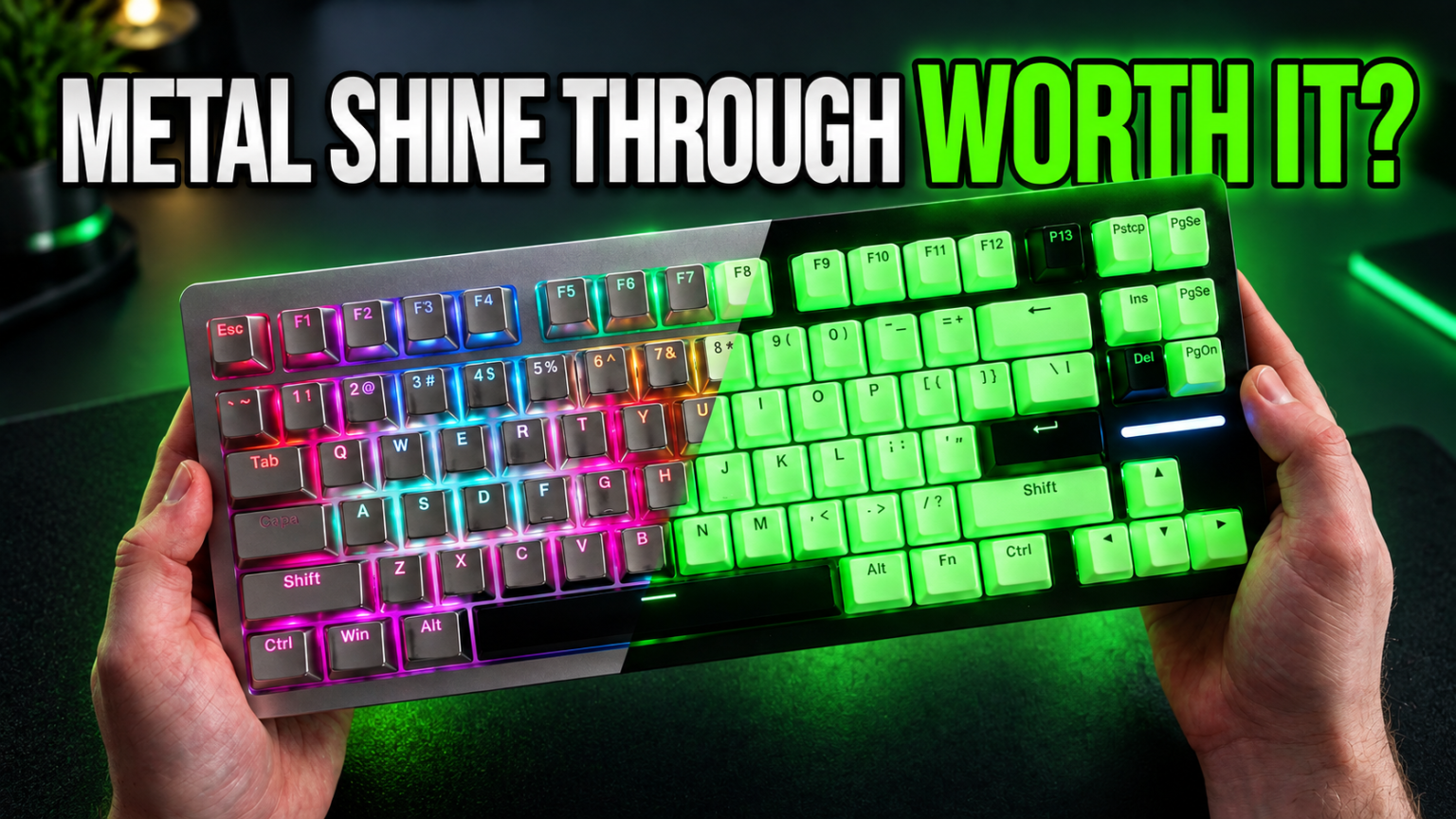
The newest Awekeys metal keycaps take that idea in a direction I have wanted for a while: actual shine-through legends.
And I don’t mean translucent plastic legends inside a metal shell. Awekeys literally cuts the legend through the metal.
It sounds almost too simple, but the result looks fantastic.
I tested both the Silver shine-through set and the Neon glow-in-the-dark version, and while they share the same basic idea, my opinion of the two ended up being very different.
The Silver set? I really like it.
The Neon version? That one needs some work.
The shine-through design is the real star
The first thing I noticed with the Awekeys shine-through keycaps is how readable the legends are even when the RGB is completely turned off.
Because the characters are physically cut through the metal, you aren’t relying on printed legends or a translucent plastic layer. You’re basically seeing darkness through the shape of each letter.
On Silver, that gives you a really sharp contrast.
Turn the RGB on and the entire personality changes.
Light comes straight through the legends while also reflecting off the metal surrounding each key. Awekeys metal caps have always had a unique way of bouncing RGB around the keyboard, but the cut-through legends add another layer to it.
On my Wooting, the keys almost look like they’re floating over the lighting.
That’s especially noticeable with stronger RGB effects or static colors. Around Halloween I usually run orange lighting, and the metal reflects that light across the board in a way plastic keycaps simply don’t.
There’s a depth to it that I really like.
Silver looks like something out of Terminator
The Silver version is probably the easiest of these to recommend based on what I’ve tested so far.
It has this slightly industrial, almost Terminator-looking aesthetic once you add RGB underneath it. Without RGB, it’s cleaner and more restrained.
That combination is actually part of what makes these work.
Metal keycaps usually demand attention. These can absolutely do that if you crank the lighting, but you can also shut the lighting off and end up with something surprisingly clean.
The satin finish helps too.
Earlier Awekeys metal keycaps I’ve used could reflect desk lighting directly back at me, especially when I had a lamp positioned above the keyboard.
They’re metal. Reflection is always going to be part of the equation.
These new Silver caps don’t seem quite as aggressive about it. The satin surface diffuses some of the light, and because portions of each key have been removed for the legend, there is less uninterrupted metal reflecting everything around you.
They’re also less prone to looking covered in fingerprints than some of the shinier versions I’ve used.
I really want the Obsidian Black set
This is probably the set I am most excited about.
Awekeys is offering the new shine-through design in multiple finishes, including Silver, Gold, Titanium, Copper and Obsidian Black.
You can see the available Awekeys metal keycap finishes here.
The Obsidian version is what immediately caught my attention.
Think about a matte black metal keycap with an actual hole cut through it for the legend. With RGB disabled, the legend is essentially a shadow.
You cannot really get much blacker than a literal absence of material.
For someone who likes stealth keyboards, this may be one of the best ways I’ve seen to do black-on-black legends without completely destroying readability.
Then you can turn RGB on whenever you want the keyboard to come alive.
I also think mixing Obsidian with Copper could look absurdly good. I’ve already used Awekeys Copper caps mixed with normal black keycaps, and that combination works. Replacing the plastic black keys with Obsidian metal shine-through caps could be my endgame setup.
That word gets thrown around a lot in keyboards, but I genuinely don’t know what I would want after that.
The Neon glow-in-the-dark set is much harder to recommend
Then we get to Neon.
This is the one Awekeys seems particularly excited about because the keycaps have a glow-in-the-dark coating.
The idea is cool.
The execution, at least on the set I received, doesn’t live up to the photos.
Under RGB, they still look good. You still get the cut-through legends, and light passes through them nicely.
The problem is that the Neon coating changes the feel of the keycaps.
Instead of smooth metal, the surface has a rough texture. The best comparison I can give is very fine sandpaper or some of those older textured phone cases.
It’s not horrible. It just doesn’t feel like metal anymore.
And if I’m spending this much money on metal keycaps, I personally want to feel the metal.
The texture also changes the sound slightly. The normal metallic set has a cleaner metallic character. Neon is a little more muted and slightly more thocky.
Some people may actually prefer that sound, but I prefer the cleaner tone of the standard metal finish.
The glow itself is disappointing
This is the main issue.
I had a hard time getting the Neon keys to glow in anything resembling a normal desk environment.
I eventually had to leave the keyboard sitting in direct sunlight for quite a while before I could get a meaningful glow.
Then I brought it into a dark room.
It glowed.
For roughly ten minutes.
After that, the effect had already faded heavily, and even the light coming from my monitor was enough to make the glow much harder to see.
That means the feature works, technically, but you need a very particular environment to appreciate it.
Pitch-dark room. Recently charged keycaps. Very little ambient light.
That’s not how most people actually use a computer.
The advertising images naturally make the Neon set look extremely bright, but I wasn’t able to reproduce that kind of sustained glow during normal use.
Because of that, I can’t really recommend buying the Awekeys Neon glow-in-the-dark keycaps specifically for the glow feature.
I’d rather see Awekeys make a smooth white metal version using the same punch-through legends.
That would look excellent.
I also worry about long-term wear on Neon
There is another reason the textured coating makes me cautious.
I’ve previously used Awekeys Viking keycaps, and some of the surface treatment on those began rubbing away over time.
The underlying metal is obviously still metal, but when you’re buying premium keycaps, you don’t want the finish disappearing where your fingers repeatedly touch the keys.
The Neon texture reminds me enough of that experience that I’d be cautious about longevity.
I can’t say the coating will definitely wear away because I haven’t used this set long enough to prove that.
But it is something I would watch.
Their traditional smooth metal caps haven’t given me that same concern.
Typing on metal still feels great

One thing that hasn’t changed is how satisfying these are to type on.
There is a solidity to metal keycaps that you simply don’t get from normal plastic caps.
Every key has more mass.
Every press feels a little more substantial.
The sound changes too.
There is a metallic resonance to the board that isn’t necessarily louder or quieter, just different.
Some people love it. Some people will immediately decide it isn’t for them.
I happen to like it quite a bit.
And importantly for anyone using a Hall Effect keyboard, I didn’t have any interference problems.
I’ve been using these on a Wooting Hall Effect board without an issue.
Installation has improved, but I found one strange problem
Older Awekeys sets I’ve used could sometimes be extremely tight on the switch stem.
Awekeys includes a small adjustment tool that lets you tighten or loosen the mounting point, and it does work.
Interestingly, this time I had the opposite issue.
A few keys were loose.
I actually flipped the keyboard over and lightly tapped it so I could identify which caps needed adjustment. After tightening those with the included tool, everything stayed in place properly.
There was, however, one weird consistency issue.
The M key.
On both of the sets I tested, the M key had a tendency to bind or stick.
I managed to improve it by adjusting the cap slightly, but the fact that the same key behaved strangely on both sets makes me think there may be something slightly off in the manufacturing tolerance for that particular mold.
Hopefully that’s something Awekeys catches before the final production run.
It’s not a deal breaker for the entire concept, but it absolutely deserves to be mentioned.
The metal spacebar still needs a heavier spring
This has been an issue across several Awekeys sets for me.
The metal spacebar is heavy.
Very heavy compared with a normal PBT or ABS spacebar.
On many switches, the stock spring simply isn’t strong enough to return it properly.
Because of that, I usually end up using a normal spacebar instead.
I’d really like to see Awekeys include a heavier replacement spring with these kits.
It would cost almost nothing relative to the price of the keycaps, and it would let people actually use the centerpiece of the set without needing to hunt down another spring.
If you’re planning on using the metal spacebar, keep that in mind.
These are still expensive keycaps
There is no getting around this part.
Metal keycaps are expensive.
You’re paying for machining, materials and a product that sits firmly in the enthusiast category.
If your goal is simply to make your keyboard functional, buying metal keycaps makes almost no sense.
A $30 PBT set will type letters just fine.
But that’s also not really the reason anyone buys these.
This is the keyboard equivalent of putting expensive wheels on a car.
You’re buying them because you like the way they look, the way they feel and the way they change the entire personality of your setup.
And unlike printed plastic caps, bare metal isn’t going to slowly become shiny from finger oils in the same way PBT or ABS does.
That makes the standard smooth versions feel more like something you could keep through several keyboards.
Move them from one build to the next.
That’s where I start understanding the price a little more.
You can see the current sets and finishes directly from Awekeys here.
Pros
- The punch-through shine-through legends look fantastic
- Extremely readable with RGB turned off
- RGB reflects beautifully across the metal
- Satin Silver finish doesn’t show fingerprints as badly as shinier metal caps
- Works properly with Hall Effect keyboards in my testing
- Solid, substantial typing feel
- Standard metal versions should hold up well over time
- Obsidian Black could be an incredible stealth keyboard option
- Multiple finishes make mixed-color builds possible
- Included adjustment tool lets you correct loose or tight keycaps
Cons
- Expensive
- Neon glow is weak outside of extremely dark environments
- Neon coating changes the feel of the metal
- Possible long-term wear concerns with textured coatings
- The M key on both review sets had a tendency to stick
- Metal spacebar is too heavy for many stock switch springs
- Metal surfaces can still reflect overhead lighting
- These won’t appeal to people who prefer softer, traditional PBT acoustics
Should you buy the Awekeys shine-through metal keycaps?
I would separate the Neon set from everything else.
I would not buy Neon specifically for the glow-in-the-dark feature.
The glow fades too quickly, requires too much charging and disappears too easily when normal ambient light is present. I also prefer the smooth feel and cleaner sound of Awekeys’ traditional metal finishes.
The Silver shine-through set is a completely different story.
That one works.
The legends are easy to read without RGB. They look incredible with RGB. The satin metal feels premium, and the punch-through design fixes one of the biggest compromises of using metal keycaps: normally you lose proper shine-through legends.
I’m even more interested in the upcoming Obsidian Black and Copper versions.
If Obsidian looks in person the way I think it will, that’s probably going directly onto my main keyboard.
Black metal. Black punch-through legends with the lighting disabled. Full RGB shining through whenever I want it.
That’s basically the keyboard I’ve been trying to build for years.
If you’re already the type of person willing to spend serious money customizing a keyboard, the new Awekeys shine-through metal keycaps are one of the more interesting premium keycap options I’ve tested.
Just skip Neon unless the white is specifically what you want and you’re comfortable with its limitations.
Give me Obsidian and Copper.
I think that’s where these are going to get really interesting.