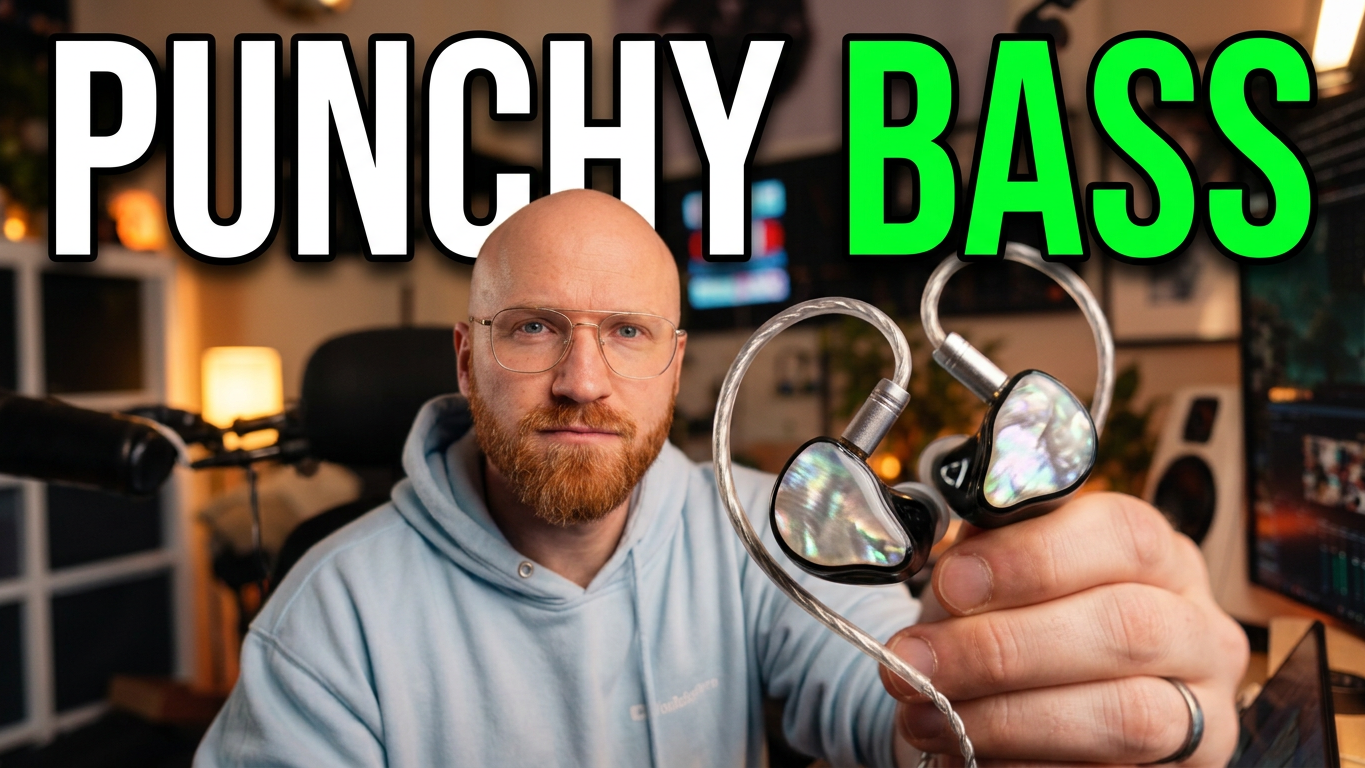

The first thing out of my mouth when I opened the EPZ G10 Pro was basically, “Oh, they’re pretty.” I said it more than once. The shiny shells got me, and then I remembered that the USB-C pair I was holding cost $39.99. A few hours later, the thing I kept coming back to was the bass. I liked it enough to keep using these for music while I worked. Then I went back into a game and remembered how much I care about being able to tell where someone’s footsteps are coming from.
That’s where I landed with the G10 Pro. I had a good time with these as everyday wired earphones, and I’d happily use them for casual games. If the whole reason I’m buying IEMs is to hear someone coming around a corner, I’d reach for the previous EPZ pair I reviewed with the boom mic.
Check the EPZ G10 Pro USB-C on Amazon
What you get for $39.99
My review pair came with the two earpieces, a braided USB-C cable with an inline microphone and controls, spare silicone tips, a USB-C-to-USB-A adapter, and a little carry pouch. I was glad to see the adapter. If the convenient port on your desktop is USB-A, you can still use the cable that came with the IEMs.
The cable also gives you some room to move. EPZ lists it at 1.7 meters, and that length makes sense on a desk where the computer might be down by your feet. The braid behaved well in my use, and the over-ear guides sat comfortably behind my ears. The cable connects to the shells with detachable 0.78 mm two-pin connectors. EPZ lists a 10 mm dynamic driver and sells a 3.5 mm version alongside the USB-C one. The built-in DAC and digital EQ discussed here are features of the USB-C version. EPZ’s G10 Pro specs and FAQ
The tips deserve a mention because I noticed something while putting them on. There’s a firmer inner collar that grips the nozzle. The outside of the tip is soft, and the center felt secure once I pushed it into place. I went with the smallest tips and kept the G10 Pro in for hours without feeling like I had to take them out for a break. The over-ear cable didn’t rub, and I didn’t have to keep pushing the shells back into place. That matters a lot more to me after a long afternoon than how shiny they looked coming out of the box. They’re still pretty, though.
The bass is the reason I’d buy these
Once I had the firmware sorted out, music was the easiest part of this review. The bass has a kick to it that I could feel, and it was the part of the sound I missed when I went back to the earlier EPZ set. If I’m sitting at my desk with a playlist on, I like that extra weight. I can see the G10 Pro being someone’s first pair of IEMs for exactly that reason. You can spend about forty bucks and get a comfortable wired pair with a sound that makes you want to put on another track.
Games were more complicated. The same punch was fun when I was playing casually. Once I started listening for quieter cues, I found footsteps harder to pick out, and I had less confidence in where they were coming from. I preferred the previous boom-mic EPZ pair for that job. That’s a comparison from my time playing with both sets. There’s room to experiment with the G10 Pro’s EQ if you want to pull some bass back, especially if you split your time between music and games.
If I were buying a single pair for work and music, with some gaming on the side, I’d be happy with how that trade lands. If I were shopping specifically for ranked FPS, the footstep performance would carry more weight for me.
See the EPZ G10 Pro USB-C listing on Amazon
The EQ is worth exploring once the web driver sees the cable
EPZ gives you game presets, music presets, community presets, and a 15-band parametric EQ on the USB-C model. I like that the presets give you somewhere to start. If you know what you want to change, the manual EQ lets you adjust individual parts of the sound. The community presets were the part I was most interested in poking around. I like seeing what someone else changed for the game they actually play. EPZ’s EQ and preset details
Getting there was a different story. The web driver wanted an account, and it took a while to recognize the set during my review. I selected English and still got a Chinese-language popup in the microphone section. The Windows configuration utility didn’t recognize my review unit at the time, either. I could play audio on the PC. The hassle was getting into the configuration tools.
I’d like EPZ to make the account optional for local controls. If I’m saving or sharing community profiles, signing in makes sense. If I’ve plugged in a pair of earphones and want to change the EQ, I want to open the page, connect the device, and get on with it. The presets worked once I got through setup, which made the extra steps all the more irritating.
The firmware update fixed the crackling I heard
During music playback, my review pair crackled enough that I started wondering about the cable. I updated the firmware from the version ending in .1 to the one ending in .3, and the crackling cleared up on my unit. That changed how I felt about the pair. I could actually leave music on without waiting to hear the next glitch.
If yours crackles the way mine did, check what firmware the updater shows. The .3 build is the one that fixed the issue in my test. I’d start with whatever update EPZ currently offers for your unit.
What the inline mic sounds like
Jump to 5:53 in the video for this one. I switch from the RE20 I use for the review to the G10 Pro’s inline mic, then go back to the RE20 at about 6:10. That gives you a quick reference for how much my voice changes when I switch inputs.
I’d use the inline mic for a casual Discord call. I still preferred the boom mic on the earlier EPZ set, especially if voice chat is a big part of why I’m buying it. EPZ calls the feature “AI noise reduction.” The clip is a sample of my voice through the mic in my setup, so you can judge that sound directly. How it handles a loud keyboard or a noisy room is a separate question. EPZ’s inline mic and control specs
Would I buy the EPZ G10 Pro?
For music at my desk, yes. I got a fit I could wear for hours, a cable with enough reach for my setup, and a bass response I genuinely enjoyed. The inline mic is handy when somebody calls, and the included USB-A adapter saves me from digging through a drawer. At the $39.99 price I reviewed it at, that’s a good package.
For competitive gaming, I’d put my money toward the earlier EPZ pair I tested with the boom mic. I found it easier to place footsteps, and I liked how its mic sounded in chat. With the G10 Pro, the moment that sold me was much simpler. The crackling was gone, I had the right tips on, and I kept putting on more music.