Redragon K688 PRO Review: A Decent Budget Keyboard With a Very Weird Amazon Problem

⌨️ Redragon K688 PRO / Bragi Pro: https://amzn.to/3SBLxi2
I have reviewed enough Redragon keyboards at this point that I generally know what to expect when one shows up. Redragon has always lived in that affordable entry to middle-of-the-road space for me. These are the keyboards I can see a parent buying for their kid, somebody picking up for college, or someone who just wants a mechanical keyboard with a bunch of features without spending $200 to $300 on it. They aren’t usually trying to compete with the enthusiast custom boards sitting on somebody’s shelf next to six different sets of keycaps. They are trying to give you a lot for the money, and to their credit, a lot of the time they actually do.
The Redragon K688 PRO is another one of those keyboards. Or the Bragi Pro. Or the K688 mechanical keyboard. Redragon, I love you guys, but seriously, pick a naming convention. Either give the keyboards names or give them numbers. I shouldn’t have to explain three different names for the same keyboard before I can even review the thing.
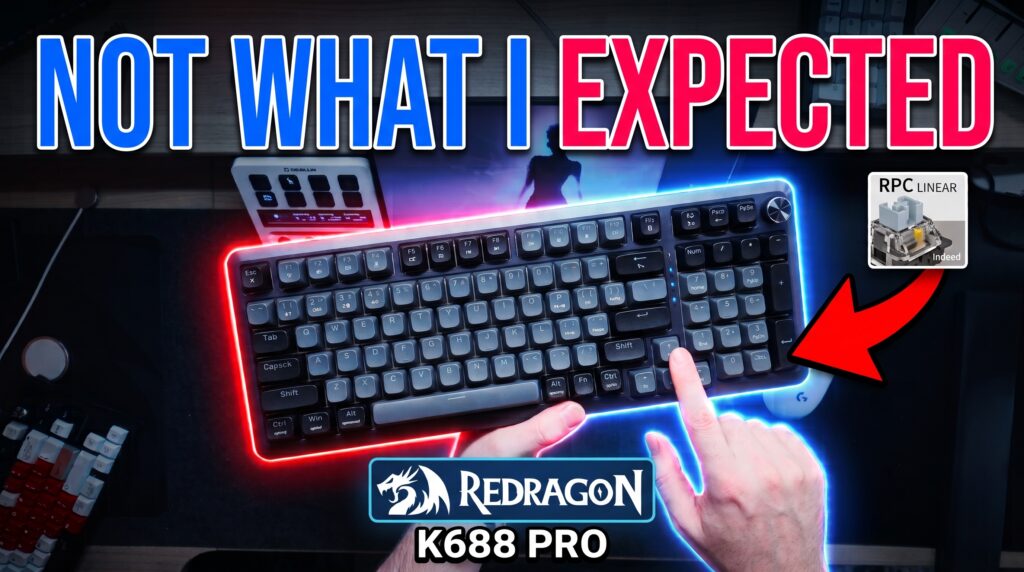
Naming aside, I actually started this review in a pretty normal place. The K688 PRO is a compact 98-key mechanical keyboard with a numpad, hot-swappable switches, wired, 2.4 GHz and Bluetooth connectivity, RGB, a knob and a layout that makes a lot of sense for people who still need a number pad but don’t necessarily want a gigantic full-size keyboard eating their entire desk.
And for a good portion of the review, I was basically thinking, “Okay, this is pretty decent.”
Then I started looking more closely at the keycaps.
Then the RGB.
Then the pricing.
Then Amazon.
And that’s where this review went completely sideways.
The 98-key layout actually makes a lot of sense
The first thing I noticed taking the K688 out of the box was how lightweight it is. This is a fairly large keyboard compared to the 60%, 65% and 75% boards that have become so common, but it really doesn’t feel heavy in your hands.
You still have the number pad on the right side, which is going to be the reason a lot of people look at this keyboard in the first place. The compromise is that everything gets compressed. You lose that giant numpad zero key, which is tragic for those of us who enjoy dramatically slapping the zero key, and some of your normal navigation cluster gets moved around. Insert, Page Up, Page Down and the rest of those functions are still there, but they aren’t sitting in the same big dedicated block that you would get on a traditional full-size board.
I actually like the size quite a bit for what it is. If you need a number pad but you also game, this gives your mouse a little more breathing room without forcing you to give up all of the full-size functionality you wanted in the first place.
Redragon also left enough separation around the arrow keys that I wasn’t constantly smashing Enter when I meant to hit an arrow. That sounds like a tiny thing until you use one of these compressed layouts where everything is touching everything else and suddenly you’re discovering keyboard shortcuts you never knew existed because your fingers are hitting three keys at once.
The overall design is pretty basic Redragon. Nothing about it is going to make you stop and stare at it from across the room, but it looks fine. You get dongle storage underneath with a magnet holding the receiver in place, switches for the connection modes, Windows and Mac controls, and adjustable feet.
Those feet, by the way, are annoying.
They’re not particularly strong and if you push the keyboard forward on your desk they have a tendency to fold themselves back in. The smaller feet did it. The larger feet did it. I kept adjusting the keyboard and then hearing them collapse underneath it.
Normally I wouldn’t spend much time talking about keyboard feet, because they’re keyboard feet, but the K688 is pretty flat without them. I wanted at least the smaller feet deployed just to get the typing angle where I liked it, which meant every time they collapsed it became one of those little things that started annoying the crap out of me.
The USB-C location is also weird. Redragon put it on the side and includes a right-angle cable to make that placement work. Why? I have no idea. I think most people would rather have the cable come out of the back, either near the center or toward the left where it can disappear into normal desk cable management. Maybe somebody out there has the exact desk setup where this side placement is perfect, but for me it feels like they solved a problem they created themselves.
None of this had killed the keyboard for me yet. These were quirks. Affordable keyboards have quirks.
Then I started typing.
The sound was better than I expected

This is probably going to surprise people after everything I’m about to say later in this review, but I actually like the sound profile of the K688 PRO.
It isn’t thocky. Don’t buy this expecting some deep, muted, creamy, thocky keyboard sound because you’re going to be disappointed. This is much more clacky and marbley, and I know “marbley” isn’t exactly a scientific acoustic measurement, but keyboard people know what I mean.
The important part is that the board is fairly consistent. The regular keys sounded good. The modifiers sounded good. Most importantly, my spacebar didn’t have an obnoxious rattle.
That’s a win.
There are expensive keyboards that somehow arrive with a spacebar sounding like somebody dropped a screw inside a soup can, so when a more affordable keyboard gives me a fairly clean stock spacebar I notice it.
There is some hollowness in the case, and if you’re somebody who likes modifying keyboards I could absolutely see a little tape mod or some additional work inside changing the sound. But I’m not reviewing what the keyboard might sound like after you take it apart and spend your afternoon modifying it. I’m reviewing what Redragon sells you.
Stock, it sounds pretty good.
I would have been completely comfortable getting to the end of this review and saying, “Hey, the K688 isn’t the best-sounding keyboard I’ve ever used, but for the price this is totally acceptable.”
If sound and layout were the entire review, we’d be having a much easier conversation.
Current price: https://amzn.to/3SBLxi2
Then I took off the keycaps
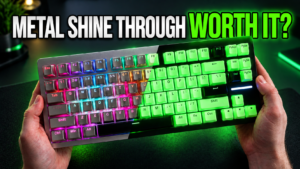
The RGB initially confused me because there is clearly plenty of light coming from the board. You can see it glowing around the switches and around the edges of the keycaps, but the legends themselves aren’t getting nearly as much light through them as I expected.
These are shine-through keycaps.
So… shine through.
I turned the studio lights down. I turned the keyboard brightness up. I looked at it straight on. I looked at it from an angle. There is a ton of light around the keys, but the legends themselves remain strangely dim.
Once I pulled a keycap off, I understood why.
The inside of the keycaps on my unit looked terrible.
I’m sorry, they did.
There was messy-looking material inside, inconsistent molding and areas that just looked rough. The spacebar made it especially obvious. When you look inside some of these keycaps you can immediately see why the lighting isn’t passing through the legends evenly.
I understand that this is an affordable keyboard. I’m not expecting artisan keycaps. I’m not expecting some $150 PBT set bundled with a budget Redragon board. But there are places where you can save money and places where saving too much money becomes visible every time somebody uses the product.
The keycaps are one of those places.
If you don’t care about RGB, this becomes considerably less important. You might put another keycap set on it anyway and move on with your life. If you’re specifically buying the keyboard because you like RGB and want illuminated legends at night, I don’t think this particular implementation is good.
It’s bright around the keys.
It is not bright through the keys.
Those are two very different things.
The double-printed Mac and Windows legends also make the keyboard busier than it needs to be. I understand the idea. One set of keycaps works for both systems, and you don’t have to remember what changes when you flip over to Mac mode. On camera they actually looked clearer than they did to my eyes while sitting at the desk. From a normal angle, especially with all that information printed on the keys, some of it starts blending together.
Some people are going to love having everything labeled. Other people are going to hate how busy it looks.
I’m somewhere in the middle.
The knob is another almost-good decision. I like having a physical knob. I will take a dedicated volume control over some Fn key combination basically every time. The knob itself feels pretty tactile, but it’s packed so tightly against the keys next to it that I kept bumping them while trying to rotate it. You can adjust your grip and carefully turn it from the top, but why am I learning a special technique for turning a volume knob?
Again, not a deal breaker.
Just weird.
That became the theme of this keyboard.
The price made me start digging
Here is where things stopped being about plastic feet and keycaps.
Redragon had directed me to a version of the keyboard that was around $70 to $80 depending on the price and coupon being shown. Then while looking around I found what appeared to be the same K688 family for substantially less money. I was seeing versions around $46.99, versions in the $50 range, another with different keycaps, another with a screen, and pricing on Redragon’s own site that didn’t cleanly match what I was seeing elsewhere.
Keyboard prices move around all the time. Amazon prices especially can be ridiculous. There are coupons, sales, different colors, warehouse stock, different sellers and all kinds of reasons one version might temporarily cost more than another.
So the price difference itself wasn’t immediately alarming.
It just made me curious.
I started checking the price history. Then I started looking through the reviews. Then I started isolating specific variants because I wanted to know what people who actually bought this version of the keyboard thought about it.
And that’s when I found something I really didn’t like.
There were hundreds and in some places thousands of reviews associated with listings around this keyboard, but once I started filtering things down, those reviews were not all clearly reviews of the keyboard sitting in front of me.
That’s a problem.
When somebody sees a product on Amazon with a big review count and a strong star rating, that is part of the purchasing decision. Most people are not going to sit there doing forensic analysis on every review to figure out whether somebody left five stars for a completely different keyboard three years ago.
I kept digging because something about it felt wrong.
What I found appeared to be a listing that had review history attached from other keyboard products or previous variants, while the newer K688 variant itself had little or no review history when filtered down specifically.
That’s the point in the video where my opinion of the situation changed.
I want to be careful about how I say this because Amazon does group legitimate variants together. Different colors of the same keyboard living on the same listing isn’t strange. A keyboard with the same underlying product and a slightly different keycap color isn’t necessarily strange either.
What I was seeing went beyond something I was comfortable ignoring.
When I looked through the listing history and the products represented in those reviews, I was seeing materially different keyboards associated with the same overall review pool.
I called it shady in the video because that is how it felt to me.
And it put me in an extremely awkward position because Redragon sponsored the video.
Yes, Redragon sponsored the video. I’m still releasing the review.
This is where I think some people misunderstand sponsorships.
Redragon has worked with me before. I have reviewed quite a few of their products. Some I’ve liked. Some I’ve criticized. They sent me this keyboard and sponsored the review.
That doesn’t buy the conclusion.
If anything, this review is a good example of why I maintain that separation.
I could have stopped digging. I could have reviewed the keyboard sitting on my desk, said the sound was decent, complained about the keycaps for five minutes and called it a day. That would have been considerably easier for everybody involved.
But once I found the listing issue, what was I supposed to do? Pretend I didn’t see it?
No.
The other option would have been not publishing the video at all, and that’s not happening either. If a company sends me something for review and I find a problem, the answer cannot be that the video disappears because the conclusion became uncomfortable.
That defeats the entire purpose of reviewing anything.
And this is what makes the K688 such a frustrating product to write about because the actual keyboard I tested isn’t some catastrophic piece of garbage.
It works.
It sounds okay.
The layout is useful.
The wireless connections worked during my testing.
It has hot-swappable switches.
You get spare switches in the box, which I always appreciate because switches can fail and being able to pull one out and replace it is one of the better things about hot-swap boards.
The dongle storage is convenient.
The knob, despite being cramped, is still useful.
There is an 8,000 mAh battery listed for the board, and I personally did not have battery problems during my review period.
That last part is important because while I found customer reviews discussing batteries losing charge quickly or degrading after months of ownership, I cannot tell you that happened to my unit. I didn’t use this keyboard for six months. I’m not going to take somebody else’s problem and magically turn it into something I experienced.
My keyboard worked.
Some customers reported longer-term battery problems.
Both of those statements can be true at the same time.
The software is the same basic Redragon downloadable software I’ve talked about before, and I still don’t love it. At this point I’ve said it enough times that I probably sound like a broken record, but Redragon needs better software. The hardware keeps getting more interesting while the software continues feeling like the thing you download because you have to, use once to configure something, and then hope you never need to open again.
So where does that leave the K688 PRO?
This one is messy because I don’t hate the keyboard.
At the right price, I actually understand exactly who it is for.
If you’re shopping around that $45 to $55 range and you need a compact keyboard with a numpad, wireless connectivity and hot-swappable switches, there is quite a bit here. The sound is better than I expected. The layout is practical. You don’t have to immediately modify it just to make it tolerable.
At $70 to $80, I start getting much more critical because there are too many keyboards competing in that price range now. The feet shouldn’t annoy me this much. The keycaps should be better. Shine-through keycaps should actually let you see the legends. The USB-C port placement shouldn’t make me ask why every time I plug it in. The knob shouldn’t be fighting with the keys next to it for space.
And none of those things are even my biggest issue anymore.
The Amazon listing situation is.
I don’t like seeing review history presented in a way that makes it difficult for a normal customer to tell which reviews actually belong to the product they’re considering. Maybe there is an internal Amazon reason for how all of those products ended up grouped. Maybe Redragon can explain exactly what happened. I’m open to hearing that explanation.
But I can only review what I see.
What I saw made me uncomfortable.
That means I can’t give you some happy little conclusion where I say “great budget keyboard, link below” and pretend the rest of the investigation didn’t happen.
Pros
- The 98-key layout keeps the numpad without taking up as much room as a traditional full-size board
- Stock sound is genuinely decent
- My spacebar had very little rattle
- Hot-swappable switches
- Spare switches included
- Wired, 2.4 GHz and Bluetooth connectivity
- Useful Windows and Mac support
- Dedicated control knob
- Magnetic dongle storage
- Lightweight and easy to move around
- Potentially a good value when the price drops into the $40 to $50 range
Cons
- Keycap quality on my sample was poor
- Shine-through RGB legends are much dimmer than they should be
- Flip-out feet collapse too easily
- Very flat typing angle without the feet
- Strange side-mounted USB-C location
- Knob is cramped against the surrounding keys
- Windows and Mac legends make the keycaps visually busy
- Redragon’s software still needs work
- Pricing between versions and listings is confusing
- Long-term battery complaints appeared in customer reviews, although I did not experience this myself
- The Amazon review/listing situation I found makes it difficult to know which reviews actually apply to the current variant
Final thoughts
I went into the Redragon K688 PRO expecting another affordable Redragon keyboard review. Talk about the layout, do a sound test, yell at Redragon about their naming convention again, complain about a few weird design decisions and move on.
Instead, I ended up spending a large portion of the review digging through Amazon listings trying to figure out what the hell I was looking at.
That’s not where I expected this to go.
The weird part is I can still sit here and tell you the keyboard itself is okay. I don’t think somebody who already owns one needs to throw it into a fire. If yours works, you like the sound and you don’t care about the weak shine-through, use it. Enjoy it.
For somebody considering buying one, though, I would pay very close attention to the exact version you’re purchasing, what price you’re paying and which reviews you’re using to make that decision.
At the lower prices, the hardware has some value.
At the higher prices, there are too many compromises.
And regardless of price, I want a cleaner answer about the review history.
Redragon, we’ve worked together plenty of times and I’ve never run into something like this with one of your products before. You need to do better here. If there’s a perfectly reasonable explanation for what I found, explain it. If the listings need cleaning up, clean them up.
Because I shouldn’t have to become an Amazon detective just to review a keyboard.
⌨️ Check the current Redragon K688 PRO / Bragi Pro price: https://amzn.to/3SBLxi2
FTC Disclosure: Some links may be compensated. No impact on my opinion.