🐉 Redragon Wyvern Pro Review: The Budget Dragon That Just Works

Price: $54.99 – $64.99
Connectivity: Tri-mode (2.4GHz, Bluetooth, USB-C)
Switches: Mint Mambo (Hot-Swappable)
Layout: Full-size (104 keys)
Compatibility: Windows & macOS
Where to Buy: Redragon Wyvern Pro on Amazon
Introduction
It’s not every day you see a full-size keyboard make a comeback in the gaming space. Everyone’s chasing smaller layouts, low-profile builds, and ultra-compact designs. But what if you’re someone who actually uses a numpad, still codes, edits, or just likes having every key right where it should be?
Enter the Redragon Wyvern Pro — a full-size tri-mode keyboard that’s part budget beast, part practical workhorse. Redragon has built a reputation for affordable peripherals, and this one lands squarely in their wheelhouse. It’s not the flashiest keyboard on the market, but it might just be one of the most useful in its price range.
Design & Build
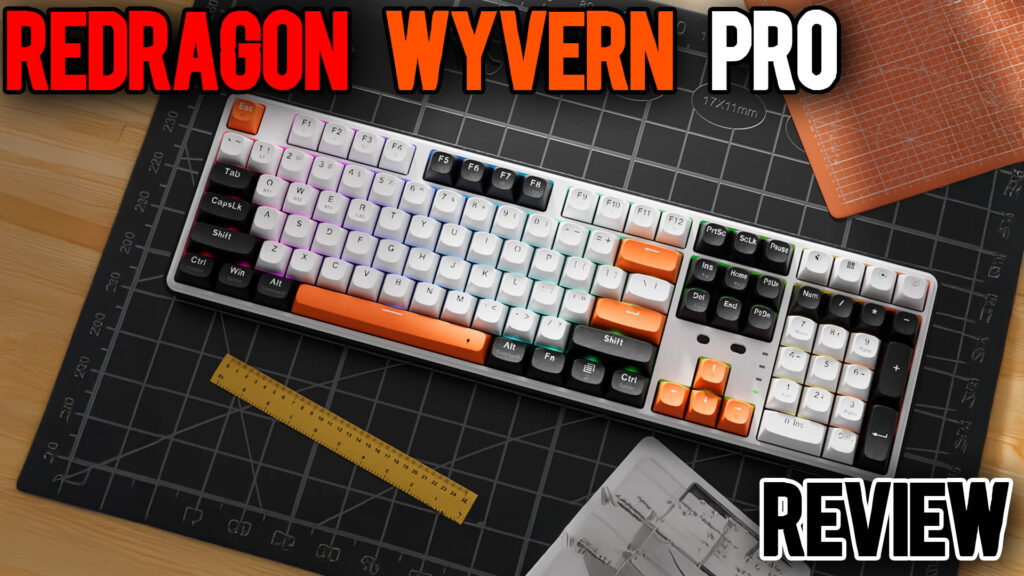
At first glance, the Wyvern Pro looks surprisingly clean. The orange accent spacebar gives it a playful splash of personality, though the double-printed Mac and Windows legends immediately give away its budget DNA. The case is lightweight plastic, which helps with portability but doesn’t inspire much confidence when flexed.
Still, Redragon deserves credit for fitting a lot into a small footprint. The bezels are thin, the full layout doesn’t eat your entire desk, and there’s even a little slot on the underside to store your 2.4GHz dongle — a small but thoughtful detail you rarely see under $70.
The keyboard has two sets of adjustable feet, though neither locks very firmly. During testing, the larger pair tended to slip slightly when typing aggressively, so if you eat or game with enthusiasm, be prepared for a little shuffle on the desk.
Connectivity & Compatibility
This is where the Wyvern Pro punches above its class. You get tri-mode connectivity:
- USB-C wired mode
- 2.4GHz wireless mode via included dongle
- Bluetooth for mobile or Mac setups
Switching between modes is handled by a simple toggle on the top edge. It connects fast, remains stable, and the 4000 mAh battery inside holds up surprisingly well. I went multiple days on Bluetooth without needing to recharge, and latency over 2.4GHz was perfectly fine for gaming.
What’s also nice is its dual-system support. There’s a toggle for Windows or macOS right on the board, and the legends are printed for both. Personally, I would have preferred separate keycaps for Mac instead of the double printing, but that’s a compromise I can live with at this price.
Typing Experience & Sound

Typing on the Wyvern Pro feels familiar. The Mint Mambo switches have a 40 g actuation force, which makes them relatively light and quick. Out of the box, they’re a bit scratchy, but that’s common for budget switches. You could easily swap them out thanks to the hot-swappable sockets, which is a huge win in this price range.
Now let’s talk sound. The Wyvern Pro claims to have gasket mounting and internal dampening. Technically, yes — but don’t expect silence. The spacebar is loud and a little hollow, and the modifier keys (Shift, Enter, Backspace) sound empty compared to the alphas. The overall tone sits between clacky and muted, but it’s inconsistent.
Still, for a stock budget board, it’s not bad. The stabilizers aren’t rattly to the point of distraction, and you can absolutely make this sound better with a little tuning.
The RGB, however, is almost nonexistent. The keycaps are opaque, the LEDs are underwhelming, and unless you’re typing in total darkness, you won’t see much glow. If bright RGB is your thing, you’ll be disappointed here.
Software & Customization
The included Redragon software is, well, fine. It exists. You can remap keys, assign macros, and play with the limited RGB effects. But here’s the kicker: each Redragon keyboard uses different software. So if you own multiple boards, you’ll need multiple installs. It’s clunky and outdated compared to modern web-based tools like VIA or QMK/VIAL.
That said, the basic functionality works. You can save profiles, adjust lighting, and customize macros without much issue. It’s just not a pleasant process.
Everyday Use
If you’re a gamer who wants a reliable, full-size wireless keyboard on a budget, the Wyvern Pro delivers. Input lag is minimal over 2.4GHz, and the lightweight build makes it easy to reposition or pack away.
For office or productivity users, it’s a mixed bag. The noise level from the spacebar alone makes it less ideal for shared spaces, and the shallow typing feel won’t impress enthusiasts. But if you just need something dependable that connects to multiple devices and works, it’s an easy choice.
This is a keyboard you buy because you need one that gets the job done — not because you want to start a collection.
Pros & Cons
✅ Pros
- Full-size layout in a compact frame
- Tri-mode connectivity (USB-C, Bluetooth, 2.4GHz)
- Hot-swappable Mint Mambo switches
- Mac & Windows compatible
- Great price-to-feature ratio
- Onboard dongle storage
- Decent typing feel once broken in
❌ Cons
- Inconsistent sound profile
- Weak RGB visibility
- Double-printed keycaps look cheap
- Scratchy switches out of the box
- Mediocre stabilizers
- Separate software required per board
Verdict
The Redragon Wyvern Pro isn’t pretending to be high-end — it’s honest about what it is. A reliable, affordable, fully featured full-size keyboard that simply works. It’s not quiet, it’s not luxurious, and it’s not trying to win any design awards. But it is easy to recommend for anyone who wants the convenience of tri-mode connectivity and hot-swap support without spending triple digits.
If you’re looking for something practical, lightweight, and ready to go out of the box, the Wyvern Pro checks all the right boxes for the price. Just don’t expect miracles from its RGB or sound profile.
⭐ Final Score
Design: 6.5/10
Typing Feel: 6.5/10
Sound Quality: 6/10
Features: 8/10
Value: 8.5/10
Overall: 6.5/10 — A solid, functional dragon for those on a budget, unless you can find something better.