
llano V12 Ultra Laptop Cooling Pad Review: A Laptop Cooler That Actually Works
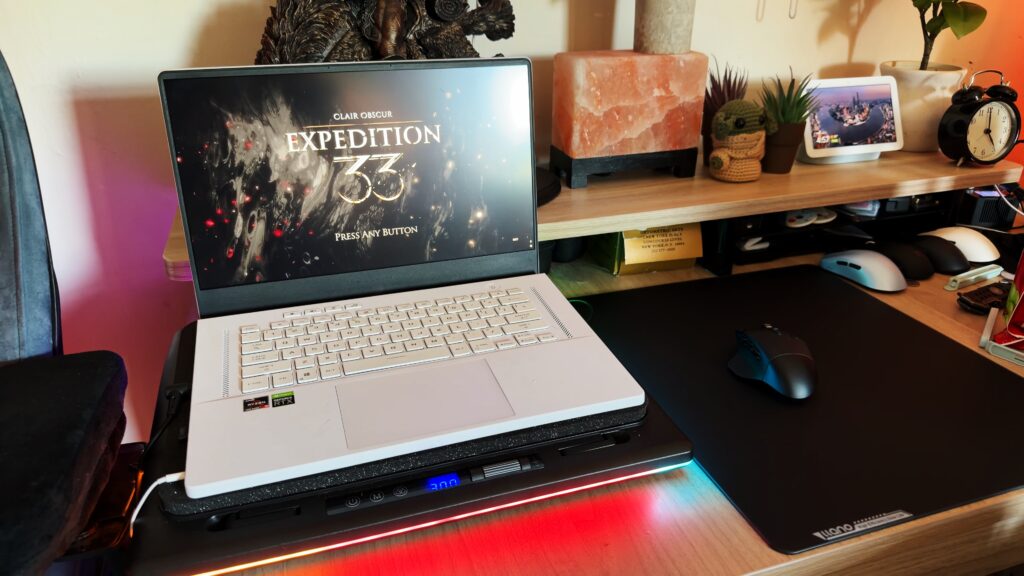

I have never been the biggest believer in laptop coolers.
That is probably the most honest way to start this review, because laptop cooling pads have always lived in a strange category of tech accessories for me. They sound useful. They look useful. They usually have a bunch of fans, some RGB, a plastic stand, and a product page full of temperature claims. Then you actually use one and half the time it feels like it is just making noise under your laptop while your machine continues to cook itself like a tiny metal oven.
So when I say the llano V12 Ultra Laptop Cooling Pad with Smart Software Control surprised me, I mean it actually surprised me.
This is not just another cheap cooling pad with a couple of exposed fans underneath the laptop. It is a more serious cooling system built around sealed airflow, a large adjustable fan, smart software control, fan curves, hardware monitoring, RGB lighting, a dust filter, extra I/O, and enough adjustability to make it feel like a real part of your desk setup.
It is also expensive. At around $179, this is not a casual throw-it-in-the-cart laptop stand. This is a premium laptop cooling pad, and that means it has to do more than glow on your desk and make fan noise.
Thankfully, it does.
You can find the llano V12 Ultra Laptop Cooling Pad with Smart Software Control here: https://amzn.to/43ywQyp
Why I Usually Do Not Recommend Laptop Cooling Pads
Most laptop coolers are not very impressive.
A lot of them are basically plastic trays with fans mounted underneath. The idea is simple: put the laptop on top, turn on the fans, and hope cooler air gets pushed into the laptop. Sometimes that helps a little. Sometimes it does almost nothing. Sometimes it just adds more noise to a laptop that is already screaming.
The bigger issue is that laptop cooling is more complicated than people think. Your laptop already has a cooling system. It has fans, vents, heatsinks, exhaust paths, and a specific airflow design. Not every laptop pulls air from the same place. Not every laptop exhausts air the same way. So when a cheap laptop cooler just blasts air directly into the bottom of the machine, it is not automatically helping.
In some cases, too much direct air pressure can potentially interfere with the laptop’s own fans instead of helping them. That is the opposite of what you want. A good laptop cooler should support the laptop’s internal cooling system, not fight it.
That is why the llano V12 Ultra feels different.
The Sealed Airflow Design Is the Point
The real reason the llano V12 Ultra works is the design.
Instead of just putting exposed fans under the laptop, this cooling pad uses a sealed airflow system. The laptop sits on top of the cooler, and the cooler pushes air through a controlled chamber. That air is spread more evenly under the laptop instead of being blasted directly into one small section.
That matters because airflow needs direction. Random air movement is not the same as useful cooling. This design feels much more intentional than the typical fan tray approach. It is trying to help the laptop breathe by feeding it cooler air across the bottom surface while avoiding that harsh direct fan pressure that some cheaper coolers rely on.
The seal is a big part of that. It helps focus the air and makes the cooler feel more like an actual cooling solution instead of just a noisy accessory.
This is one of the first laptop cooling pads I have used where I did not feel like I was pretending it was working. You can actually see the results.
Cooling Performance: It Actually Drops Temperatures
The most important question with any laptop cooler is simple.
Does it cool the laptop?
With the llano V12 Ultra, yes. It does.
When using the cooler and ramping the fan up through the software, the temperature drop was clear. In the review, the laptop dropped by around 10 degrees Celsius while the cooling pad was running. That is not a tiny little maybe-it-helped result. That is a real change.
For people using gaming laptops, that kind of drop can be useful. Gaming laptops already run hot, and anything that helps them stay cooler under load can help with comfort, stability, and potentially sustained performance. The same goes for video editing laptops, development laptops, rendering machines, or any laptop being used for heavier work.
This is not magic. It will not fix a laptop with clogged internal fans, old thermal paste, poor internal design, or a machine that is already failing. But if your laptop is functional and simply needs better external airflow during heavy use, this cooling pad actually helps.
That is the main reason I can recommend it.
Smart Software Control Is a Big Deal
One of the strongest parts of the llano V12 Ultra is the software.
Most laptop cooling pads leave you guessing. You turn them on, hear the fans, and then wonder if anything is actually happening. The llano software gives you hardware information, temperature monitoring, fan control, preset modes, custom fan curves, and RGB controls.
That changes the whole experience.
Being able to see your laptop temperatures while controlling the fan makes the cooler feel much more useful. You are not just trusting that it works. You can watch the temperatures drop. You can adjust the fan speed. You can set custom behavior based on temperature.
The custom fan curve is especially useful. You can decide how aggressive the fan should be at different temperature points. If you want the cooler to stay quieter during light work and ramp up when your laptop starts getting hot, you can do that. If you want it to start cooling harder earlier, you can do that too.
There are also AI modes. I am always skeptical when companies put AI on everything, and this is no different. I am not exactly sure how much true AI is happening here versus smart preset behavior and automatic fan ramping. But in actual use, the modes seem to work, and the cooler responds in a way that helps bring temperatures down.
I would not buy this because it says AI.
I would buy it because the software gives you control, visibility, and actual useful cooling behavior.
The Software Is Also a Good Hardware Monitor
One thing I did not expect to like as much as I did was the hardware monitoring side of the software.
It gives you a clear look at system temperatures and performance information, which makes the cooling pad feel more connected to the laptop instead of being some external thing just sitting underneath it. For people who like to monitor temperatures, tune fan behavior, or understand what their machine is doing under load, this is genuinely helpful.
A lot of laptop coolers do not have anything like this. They just have a dial, a button, or maybe a tiny display. The llano V12 Ultra feels more complete because the software gives the product context. You can see what is happening, adjust what you need, and know whether the cooler is actually doing its job.
That is a major advantage.
Fan Power and Noise
The llano V12 Ultra can push a lot of air.
The fan can ramp from lower speeds up to a very aggressive maximum, and when it gets going, you can hear it. This is not silent cooling. At higher fan speeds, it is loud enough that you will notice it.
That is the tradeoff with airflow. If you want serious cooling, the fan has to move a lot of air, and moving a lot of air creates noise. There is no way around that entirely. The good thing is that you do not have to run it at maximum all the time. Because the software allows custom fan curves, you can tune it for your situation.
For gaming with headphones, the noise probably will not matter much. For desk work, streaming, voice recording, or working in a quiet room, you will want to balance the fan speed carefully.
I do wish it could push that much air a little more quietly. But at least the noise is doing something. I have used laptop coolers that were loud and useless. This one is loud when pushed, but it is also moving serious air and dropping temperatures.
That is a much better trade.
RGB Lighting
The RGB lighting on the llano V12 Ultra looks good.
It has lighting on the sides, front, and back, and it gives the cooling pad a clean gaming setup look without being too ugly or cheap-looking. The front grille and lighting design help it feel more premium on the desk, which is important because this is not a small accessory. If you are putting a large laptop cooling pad in your setup, it helps if it looks like it belongs there.
You can control the RGB manually using the buttons on the unit, or you can use the software. The software options are not endless, but they are enough to pick a look that fits your setup.
And yes, I like RGB. If something performs well and also has good RGB, I am not going to complain.
Adjustable Height and Laptop Support
The llano V12 Ultra supports larger laptops, including 15-inch to 17-inch machines, and it has adjustable feet to hold the laptop in place.
The height adjustment is also useful. You can use it at a lower angle for typing, or raise it higher if you want the laptop to act more like a second screen. If you use an external keyboard and mouse, the higher angle can make the laptop screen more comfortable. If you type directly on the laptop, the lower positions will probably make more sense.
The little feet that hold the laptop feel practical, and the overall stand design feels stable enough for real use. Some laptop stands feel wobbly the second you put anything large on them. This one feels more prepared for bigger laptops.
That is important, because gaming laptops and creator laptops are often heavy.
Dust Filter for Pet Owners and Dusty Rooms
The dust filter is one of my favorite practical features.
I have cats, and anyone with pets knows dust and hair are a constant battle. If you are pushing more air toward your laptop, you also have to think about what else might be getting pushed toward it. Dust, hair, and debris can build up inside a laptop over time and make cooling worse.
The removable filter helps protect against that.
It is a small feature, but it makes the whole product feel more thoughtful. This is not just about raw airflow. It is also about keeping that airflow cleaner before it reaches your laptop.
For long-term use, that is important.
Extra USB Ports
The llano V12 Ultra also gives you extra I/O.
You get multiple USB ports, and the cooler connects to the laptop so the software can read and control it. Having extra ports built into the cooling pad is useful, especially if your laptop has limited connectivity or if your desk setup already has a lot plugged in.
I would not buy this only for the USB hub, but it is a nice bonus. Since the cooling pad is already part of the setup, adding a few more usable ports makes sense.
However, this is also where one of my complaints comes in.
The One-Sided I/O Can Be Annoying
The ports and power connection are only on one side.
Depending on your desk layout, this may not be a problem. For some people, it will be perfectly fine. For others, it may create annoying cable routing. In my review setup, it was frustrating because I had to pull power from the wrong side of the room.
I really wish the power connection was on the back, or that the unit had dual-sided options. A rear power input would make this much easier to fit into more setups.
This is not enough to ruin the product, but on something this expensive, I do think cable placement matters. Desk setups are personal, and one-sided I/O limits flexibility.
The Touch Controls Are Not Perfect
Another downside is the touch controls.
They look clean, and they work, but I would rather have physical buttons. Touch buttons can be finicky, especially when you have to hold them down or interact with them repeatedly. Sometimes they do not register as cleanly as a real button would.
For a premium product, I think tactile controls would have been better.
This is not a dealbreaker, but it is one of those things that stands out because the rest of the cooler feels pretty well thought out. The cooling design is smart. The software is useful. The airflow works. Then you go to use the touch controls and think, “I wish this was just a normal button.”
Price: This Is the Hard Part
The llano V12 Ultra is expensive.
At around $179, this is not a budget laptop cooling pad. There are cheaper cooling pads. There are cheaper stands. There are cheaper fans. If you only use your laptop for browsing, writing, watching videos, or light work, this is probably overkill.
But if you are using a powerful laptop for gaming, development, video editing, rendering, server hosting, or other heavy workloads, the price starts to make more sense.
A good gaming laptop is expensive. A good creator laptop is expensive. If your machine is running hot all the time, a cooling pad that can drop temperatures in a meaningful way may be worth the investment.
That is the real question with this product. It is not “is this cheap?” because it is not. The question is whether it works well enough to justify being expensive.
For the right user, I think it does.
Pros and Cons
Pros
- Actually drops laptop temperatures
- Sealed airflow design makes more sense than basic fan pads
- Smart software control is genuinely useful
- Hardware monitoring lets you see temperature changes
- Custom fan curves give you real control
- AI fan modes seem to work, even if the naming feels buzzwordy
- Strong airflow when needed
- RGB lighting looks good
- Adjustable height and typing/viewing angles
- Supports larger laptops up to around 17 inches
- Built-in USB hub functionality
- Removable dust filter is great for pet owners
- Replaceable/removable parts make it feel less disposable
- Good for gaming laptops, creator laptops, development laptops, and heavier workloads
Cons
- Expensive at around $179
- Fan can get loud at higher speeds
- Touch controls can be finicky
- Physical buttons would have been better
- I/O and power are only on one side
- RGB options in software are useful but somewhat limited
- Overkill for casual laptop users
Who Should Buy the llano V12 Ultra?
The llano V12 Ultra is for people who push their laptops hard.
If you use a gaming laptop, this makes sense. If you edit video on a laptop, this makes sense. If you develop, compile, run servers, host game environments, or do heavier creative work, this makes sense. If your laptop gets hot fast and stays hot under load, this is one of the few laptop cooling pads I would actually recommend looking at.
It is also a good option if you want control. The software and fan curves make this much more useful than a basic cooler. You can tune it, monitor it, and adjust it based on how your laptop behaves.
If you only use your laptop casually, you probably do not need this. A normal laptop stand may be enough. But if you already know your laptop runs hot and you want something stronger than a cheap fan tray, this is worth considering.
Final Thoughts
The llano V12 Ultra Laptop Cooling Pad with Smart Software Control made me rethink laptop coolers.
I still think a lot of laptop cooling pads are not worth buying. I still think many of them are cheap plastic accessories that make more noise than difference. I still think the category is filled with products that look more useful than they actually are.
But this one is different.
The sealed airflow design works. The software is useful. The temperature drop is real. The fan is powerful. The adjustable stand is practical. The dust filter is smart. The RGB looks good. The whole product feels like someone actually thought about why laptop coolers usually fail and tried to build something better.
It is not perfect. The price is high. The fan gets loud. The touch controls should be physical buttons. The one-sided I/O is annoying. But the most important thing is that it does what it is supposed to do.
It cools the laptop.
For this category, that is enough to make it stand out.
If you are looking for a laptop cooling pad that actually works, the llano V12 Ultra Laptop Cooling Pad with Smart Software Control is one I can recommend.