Redragon Wyvern LCD Pro K761 Pro Review: The Full-Size Keyboard That Has Everything

⌨️ Redragon Wyvern LCD Pro K761 Pro: https://amzn.to/4u4YIVz
Redragon has a naming problem. I say that lovingly, but also with the exhausted tone of someone who has reviewed enough of these keyboards to know that Redragon often makes the actual keyboard easier to understand than the product name. This one is called the Redragon Wyvern LCD Pro, but it is also the Wyvern K761 Pro, and depending on where you are looking, what box you have in front of you, and which product page you landed on, you may have a brief moment where you ask yourself if you ordered the right thing.
The funny part is that Wyvern is actually a pretty good name. It is a red dragon keyboard, and a wyvern is dragon-adjacent enough that it works. It is thematic. It is memorable. It is a lot better than just throwing a K-number into the void and hoping people remember it. So, Redragon, if you are listening, lean into the cool names. Let the Wyvern be the Wyvern.
Naming aside, the Redragon Wyvern LCD Pro K761 Pro is a full-size mechanical keyboard with a lot going on. This is not some tiny 60 percent board made for people who think a function row is a luxury. This is a proper full-size layout with a numpad, a knob, a built-in screen, tri-mode connectivity, Windows and Mac support, Redragon software, shine-through keycaps, a 4000mAh battery, and Mint Mambo switches that actually sound pretty good.
That combination makes this keyboard interesting right away because the full-size mechanical keyboard space has become weirdly niche. There are tons of 65 percent, 75 percent, TKL, compact Hall Effect, and low-profile boards out there, but the full-size market is not as exciting as it used to be. If you want a full-size board that sounds good, has modern features, does not feel like a bland office slab, and does not cost a small fortune, your options start getting narrower than you would expect.
That is where the Wyvern K761 Pro becomes both interesting and confusing. It has a lot of the right ingredients. It sounds better than expected. It has a nice soft typing profile. It has the features people like to see in modern prebuilt keyboards. But it also has enough odd design choices that I cannot call it an easy instant recommendation. It is one of those keyboards where I keep saying, “This is not bad,” but I also keep asking, “Who exactly is this for?”
Design and First Impressions
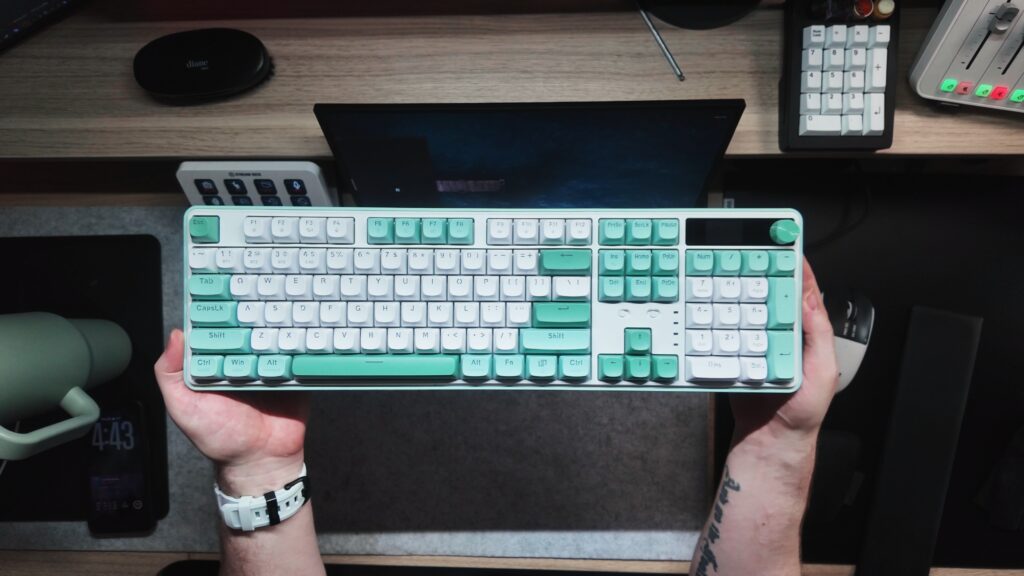
Visually, the Wyvern K761 Pro is a pretty nice keyboard. The mint colorway gives it a softer, cleaner look than the usual aggressive gaming keyboard aesthetic. It does not scream gamer desk in the same way that older Redragon boards sometimes did. This feels more like something that could sit in an office, a home workspace, or a desk setup where you want a little bit of color without going full RGB spaceship.
The accents on the side of the board match the keycap colorway, which is a nice touch. Redragon did not just throw keycaps on a black case and call it a day. There is some actual visual cohesion here. Even the feet have that white accenting, which makes the board feel more intentionally designed.
There is also a place for the wireless dongle, which is always appreciated. It is one of those little features that sounds boring until you lose a dongle and suddenly your wireless keyboard becomes a wired keyboard with emotional damage.
The problem is that the feet do not lock very well. Both the larger and smaller feet tend to collapse if the board slides. It is not the end of the world, but it is one of those small daily-use annoyances that can make a keyboard feel cheaper than it should. Feet should lock. That is the whole job. If a keyboard moves a little and the feet give up immediately, that is not great.
The other visual oddity is the keycap color matching. The spacebar, a couple of nearby keys, and the arrow keys use a different mint tone than the rest of the board. This may be intentional for visual separation, but in person it can look a little strange, almost like those keys were left out in the sun or pulled from a different set. Some people may like the contrast, but it is the kind of thing that once you notice, you may keep noticing.
Keycaps and Legends
The keycaps are shine-through, which I personally like in theory. I know the enthusiast crowd can be very anti-shine-through because shine-through keycaps can affect sound and often feel less premium than thicker non-shine-through PBT caps. But I still understand the appeal. If a keyboard has RGB, it can be nice to actually see the legends light up. That is especially true for workspaces, darker rooms, and people who just like functional lighting.
The problem is that if you are going to use shine-through keycaps, the RGB needs to be bright enough to make that choice worth it. On the Wyvern K761 Pro, the RGB is not very bright. It is not completely useless, but it does not feel strong enough to justify the shine-through design. You can see the legends, but not in a way that feels especially crisp or impressive. On camera, the LEDs also show some flicker, which suggests this is one of the places where Redragon cut costs.
Then there are the legends themselves. This is probably one of the strangest choices on the board. Many of the main key legends are pushed toward the right side of the keycap instead of being centered. It throws off the visual balance of the keyboard. When you are typing and glance down, your brain expects legends to be in a certain position. When they are not, it can feel subtly wrong.
This might not bother everyone. Some people barely look at their keyboard while typing. Some people will not care. But for me, it stands out. It is especially odd because not every key follows the same visual language. If the whole board had a consistent design direction, maybe it would feel more intentional. Instead, it feels like a design decision that was made for reasons I do not fully understand.
The board also has dual Windows and Mac legends printed on the keys. This is practical because the keyboard supports both Windows and Mac, but it does make the keycaps visually busier. On the darker keys, it is not too distracting. On the lighter keys and function row, it is more noticeable. Redragon does this often, and I understand why, but it is not always the cleanest look.
The LCD Screen and Knob
The Wyvern K761 Pro includes a built-in screen. You can use it for GIFs, images, time, and general keyboard information. Is it necessary? No. Is it fun? Yes. This is one of those features that is not going to make anyone type faster, but it does make the keyboard feel more modern and playful.
The issue is the execution. The screen takes up a noticeable amount of space on the board, but the actual display does not seem to use the full surrounding area. There is a lot of dead space around it. Redragon calls this area a smart info island, and that is a fun phrase, but half the island feels uninhabited. It reminds me a bit of Apple-style design where the cutout or display area exists as a visual feature, but in this case it feels like there was room to make it more useful.
The knob, on the other hand, is simple and good. It feels tactile, it works, and it is one of those features that people tend to love once they have it. A volume knob on a keyboard is not new anymore, but it is still one of the easiest quality-of-life additions to appreciate. You do not need to think too hard about it. It is a knob. It does knob things. We like knobs.
USB-C Port Placement
One of the weirdest physical design choices is the USB-C port placement. Most keyboards I use place the USB-C port in the center or toward the left side. The Wyvern K761 Pro places it on the right side. That meant my normal cable setup did not reach, and I had to use a different wire.
At first, that annoyed me. Then I thought about it more and realized there might actually be a use case here. If your mouse cable, USB hub, or desk routing is already on the right side, having the keyboard cable exit from that side might make sense. It is not automatically bad. It is just unusual compared to most of my keyboard setups.
So this one lands in a strange place. I do not hate it. I might even understand it. But I do think buyers should know about it because if your desk is already wired for a center or left-side USB-C keyboard, this may require some cable rearranging.
Switches and Typing Feel
The Wyvern K761 Pro uses Mint Mambo switches, and I have to give Redragon credit here because that name is great. The switches match the minty color theme, which is fun, and they also help give the board its softer, deeper sound profile.
This is a thockier board. It is not aggressively loud, sharp, or plasticky. It has a deeper sound than I expected from a Redragon full-size keyboard in this price range. It is soft enough that I could see this being used in an office without immediately making everyone around you regret your hobby.
The typing feel is nice. It is not endgame. It is not custom-board perfect. But it is pleasant. The board has a gasket-style design and internal dampening materials, including foam layers, which help the sound. It still has a little bit of hollowness, and not every key sounds perfectly uniform, but for the price range and the feature set, the typing experience is one of the stronger parts of the keyboard.
The stabilizers are not awful, the overall sound is not bad, and the board avoids the harsh plastic clack that can make some budget full-size keyboards feel cheap. If someone told me they wanted a full-size keyboard that sounds decent out of the box and does not require modding, this would at least be in the conversation.
Sound Profile

The sound profile is probably the biggest win for the Wyvern K761 Pro. It is thocky, soft, and not overly loud. It has enough depth to feel satisfying, but it is not so heavy or muted that it feels lifeless.
That said, it is not perfectly consistent. Some keys sound better than others. There is a little hollowness in places. The shine-through keycaps and north-facing RGB may also affect the sound profile compared to thicker, non-shine-through caps. Enthusiasts who care deeply about sound tuning may notice these things immediately.
But for the average buyer, especially someone looking for a full-size board with a softer sound, this is better than I expected. Redragon has been improving in this area, and this keyboard continues that trend. It is not the best-sounding board I have used, but it does not embarrass itself. It actually sounds pretty good.
RGB and Lighting
The RGB is where things get weaker. The board has shine-through keycaps, but the LEDs are not bright enough to make the legends pop the way they should. If you are buying this because you want a bright RGB board with clearly illuminated legends, you may be disappointed.
The lighting is there. It works. You can adjust brightness and effects from the board, which is useful. But it does not feel like a standout feature. This is a shame because shine-through keycaps need good lighting to justify themselves. Otherwise, you end up with keycaps that may compromise sound slightly without delivering the strong lighting payoff.
The RGB also appears to flicker on camera, which does not affect everyone in normal use but does point to cheaper LED implementation. It is not a dealbreaker, but it is one of those places where the keyboard feels more budget than premium.
Connectivity and Battery
The Wyvern K761 Pro has tri-mode connectivity, which means wired USB-C, Bluetooth, and 2.4GHz wireless. That is exactly what I want to see in a modern keyboard. Full-size boards are often used for work, productivity, and mixed desk setups, so being able to swap between devices matters.
It also has Windows and Mac support, with visible function legends for both. Again, this makes the keycaps busier, but the functionality is useful. If you move between a PC and a Mac, this board is built to handle that.
The 4000mAh battery is another practical feature. Redragon even leans into the “anti-anxiety” battery messaging, which is funny because at this point everything on my desk has a battery and I have battery anxiety from the sheer number of devices that need charging. Still, 4000mAh is a nice capacity for a wireless keyboard, especially one with a screen and RGB.
Software
The keyboard uses Redragon software. It is not QMK or VIA, which is worth noting. For many mainstream buyers, that will not matter. Redragon software is usually fine for basic remapping, lighting, screen customization, and general keyboard settings.
But for keyboard enthusiasts, no QMK or VIA support is a limitation. VIA has become a major selling point because it makes remapping easier, cleaner, and more universal. When a keyboard does not support it, you are dependent on the manufacturer’s software.
For a Redragon board at this price, I do not think this is shocking. But it is part of the overall “jack of all trades, master of none” feeling. The keyboard gives you a lot, but not always in the enthusiast-preferred way.
Price and Value
This is where the review gets tricky. The Wyvern K761 Pro is listed around $74.99 officially, but Amazon pricing may bring it down to around $64.99, with some colorways or variants dipping closer to $59.99 and others going higher.
At $59.99, this keyboard becomes easier to recommend. A full-size keyboard with tri-mode connectivity, a screen, knob, decent sound, Mint Mambo switches, wireless support, and a 4000mAh battery is a pretty compelling package at that price.
At $74.99 or $76.99, it becomes a harder sell. Not because it is bad, but because the flaws become more noticeable when the price rises. The weak RGB, odd legends, loose feet, unused screen space, and lack of VIA support all start to matter more.
Full-size keyboards often cost a little more because they are physically larger and less trendy than compact layouts, but that does not automatically make every full-size board a good value. The Wyvern K761 Pro lives in that weird space where it is affordable compared to many premium full-size boards, but not cheap enough to ignore all the compromises.
Who Is This Keyboard For?
This is the question I kept coming back to. Who is the Redragon Wyvern K761 Pro actually for?
I think it makes the most sense for someone who specifically wants a full-size keyboard with modern features and a softer sound profile, but does not want to spend premium keyboard money. If you need a numpad, want wireless, like having a knob, enjoy the idea of a small LCD screen, and love the mint colorway, this keyboard has a lot going for it.
It also makes sense as an office keyboard if your office allows mechanical keyboards. The sound is soft enough that it should be less annoying than louder clacky boards, and the full-size layout is useful for productivity. It is not silent, but it is not obnoxious.
For gamers, it is fine, but I do not think gaming is the main reason to buy it. It has wireless, it has RGB, and it has a full layout, but if gaming performance is your top priority, there are Hall Effect boards and more specialized gaming keyboards that make more sense.
For keyboard enthusiasts, this is probably not the board that changes your life. The keycaps are odd, the RGB is weak, the legends are strange, and the software is not VIA. But if you are buying it for what it is, a feature-packed full-size Redragon board with a decent stock sound, it is not bad.
Pros
- Nice softer thocky sound profile for a stock full-size keyboard
- Full-size layout with numpad
- Mint Mambo switches sound and feel pretty good
- Tri-mode connectivity
- 4000mAh battery
- Built-in LCD screen for GIFs, images, and information
- Tactile knob feels good
- Windows and Mac support
- Good feature set for the price when discounted
- Softer sound could work in an office
- Colorway is distinct and visually fun
- Dongle storage is included
- Gasket-style build and internal foam help the sound
Cons
- Redragon naming is confusing across box, product name, and listing
- RGB is not very bright
- Shine-through keycaps do not fully benefit from the weaker LEDs
- LED flicker can appear on camera
- Key legends are oddly pushed to the right
- Dual Mac and Windows legends make the keycaps busy
- Some mint keys look mismatched in color
- Keyboard feet do not lock securely
- LCD screen area has a lot of unused dead space
- USB-C port placement may not fit every desk setup
- No QMK or VIA support
- Some keys sound less consistent than others
- Price can feel high depending on the listing
Final Thoughts
The Redragon Wyvern LCD Pro K761 Pro is not a bad keyboard. In fact, it does several things pretty well. It sounds better than expected, it has a soft typing profile, it gives you a full-size layout, it has wireless support, a knob, a screen, a big battery, and enough features that it feels like Redragon tried to pack everything into one board.
But that is also the issue. It has everything, yet nothing about it completely takes over the conversation. The sound is good, but not amazing. The screen is fun, but underused. The RGB is present, but not bright. The keycaps are functional, but visually strange. The price is reasonable at a discount, but harder to justify when it creeps higher.
This is a jack of all trades keyboard. It is a full-size, minty, feature-packed, soft-sounding Redragon board that will make sense for the right person. If you need a full-size keyboard, like the colorway, want a screen and knob, and find it near the lower end of its price range, it is worth considering.
If you are looking for the best RGB, the cleanest keycaps, the most premium typing experience, or the most enthusiast-friendly software, this is probably not the one.
The Wyvern K761 Pro lives somewhere in the middle. Not terrible. Not great. Better sounding than expected. A little weird. Very Redragon.
And honestly, sometimes that is exactly the review.