Redragon Artemis Pro Anime Desk Setup Review
Waifu Desk On A Budget – Is It Actually Good Or Just Cute?
If you have been around the mechanical keyboard world for any amount of time, you have probably seen Redragon pop up in budget recommendation lists. They are that brand people mention with a shrug and a “for the price, it is fine.”
So when a whole stack of Redragon boxes showed up at the studio, all anime themed, I will be honest. I expected this to be a meme setup at best. A full waifu desk for the bit, not something that would end up sounding or feeling genuinely solid.
Then I typed on the Redragon Artemis Pro Anime Keyboard and used the Predator Pro Anime Mouse for a few gaming sessions. And now I need to talk about it.
This is a surprisingly capable little ecosystem, wrapped in unapologetically loud anime art, with a price tag that makes it very easy to justify as a gift or starter setup.
The Full Anime Loadout
For this review, I built a full Redragon desk:
- Redragon Artemis K719 Pro Anime Keyboard
- Redragon Predator M612 Pro Anime Gaming Mouse
- Redragon SS551 Stream Controller
- Redragon Keyboard Wrist Rest Pad
- Redragon PG1M Glass Gaming Mouse Pad
You can pick up the main pieces directly from Redragon with the CRAFTINGWORLDS discount baked into these links:
- Stream Controller:
https://redragonshop.com/discount/CRAFTINGWORLDS?redirect=/products/ss551-stream-controller&aff=5534 - Wrist Rest Pad:
https://redragonshop.com/discount/CRAFTINGWORLDS?redirect=/products/keyboard-wrist-rest-pad&aff=5534 - PG1M Glass Mouse Pad:
https://redragonshop.com/discount/CRAFTINGWORLDS?redirect=/products/pg1m-glass-gaming-mouse-pad&aff=5534 - Artemis K719 Pro Anime Keyboard:
https://redragonshop.com/discount/CRAFTINGWORLDS?redirect=/products/artemis-k719-pro-anime-keyboard&aff=5534 - Predator M612 Pro Anime Mouse:
https://redragonshop.com/discount/CRAFTINGWORLDS?redirect=/products/predator-m612-pro-anime-gaming-mouse&aff=5534
If you prefer Amazon, you can also find the keyboard and mouse there:
- Keyboard: https://amzn.to/483pO7O
- Mouse: https://amzn.to/3XQpmUh
Put it all together and you end up with a desk that looks like someone let an anime artist loose on a budget Logitech setup in the best possible way.
Design & Build – Plastic, Light, Surprisingly Thought Out
Let us get one thing out of the way: this is not an all aluminum, boutique, hand assembled keyboard. The Artemis Pro is unapologetically plastic and extremely lightweight.
Some people will see that as a con. For me, it is simply a question of expectations. At this price point, plastic is expected. What matters is whether it feels cheap or just light.
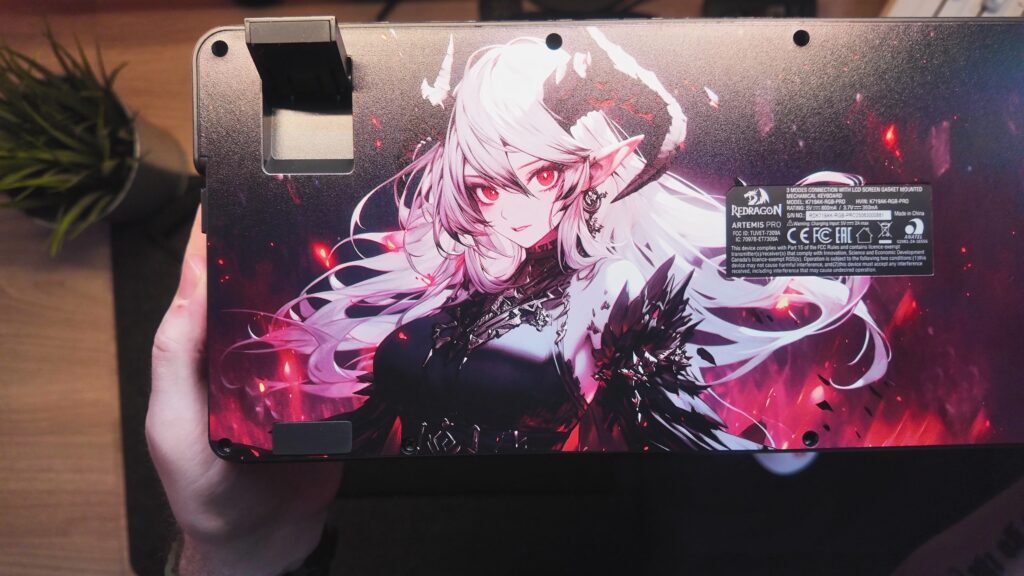
On the desk, the Artemis Pro feels solid enough. No scary creaking, no immediate “I am about to snap this in half” flex. The case is covered in anime artwork, from the top to the back to the underside. The spacebar has its own little character moment, the top right has a pixel sword graphic, and even flipping the board over reveals more nicely printed art, feet, and rubber pads.
The layout is full size with a number pad. The zero key is not the big extended style, but functionally it is still a normal numpad. You also get a knob in the top right that feels surprisingly tactile.
The only real build annoyance is the feet. There are two sets of flip out feet for different angles, plus rubber pads for using it flat. The default angle of the board is already pretty comfortable, so you may not even need the feet. And honestly, that might be for the best because if you regularly slide the board out of the way for food, the feet have a tendency to fold or give out. I would recommend either running the board flat or using the smaller feet, which are less dramatic and feel more stable.
Connectivity, Screen, And RGB
The Artemis Pro is a tri mode keyboard:
- 2.4 GHz wireless
- Bluetooth
- Wired USB
On the side you have your USB port and toggle for modes. Redragon includes a right angle USB cable in the box. I appreciate the thought, but if you are using a left oriented USB port, that cable angle is not ideal. It is one of those “nice to include, probably not what I will actually use” accessories.
Up top you get bright RGB across the entire board, which is honestly one of Redragon’s strengths. They know how to do “gamer RGB” in a way that still looks fairly clean and not like a Christmas tree explosion.
Front and center, just above the arrows, lives the little screen. This can show:
- An animated GIF
- A clock
- System indicators and effects information
Through the onboard controls you can change lighting effects, colors, brightness, speed, language, time format, and more. I know little screens on keyboards divide people. Personally, I love them. As long as they do not get in the way of typing or block important keys, they are just fun. This one is exactly that: a neat extra that lets you throw a GIF on your board and forget about it.
Switches & Sound – Marbly On A Budget
Redragon calls the switches “hi fi custom switches.” I have no idea who actually manufactures them. What I care about is how they feel and sound, and here is where the Artemis Pro really surprised me.
Out of the box, without any user modding, the board has a marbly, full sound that many enthusiasts spend a lot of time and money chasing on more expensive boards.
It is not a super deep “thock.” It is more of a soft, marbly clack with a decently damped character that makes the keyboard sound intentional instead of hollow and rattly. According to Redragon there is a multi layer dampening stack inside, and I believe it. Whatever they did, it works.
If you are into ultra refined customs, this will not replace your end game board. But if you are coming from a typical off the shelf gaming keyboard and you want something that sounds genuinely pleasant without any work, this is a big step up.
And again, this is on a roughly 63 dollar board.
Predator Pro Anime Mouse – G502 But Make It Waifu
Moving to the mouse, the Predator M612 Pro Anime is probably my favorite part of the whole setup.
Shape wise, it is very clearly sitting in the same family as the Logitech G502. You get:
- Ergonomic right handed shell
- Thumb rest
- Textured side grips
- A sculpted button layout that feels instantly familiar
The difference is that the Predator Pro feels like a G502 that went to an anime convention and never came back.
The coating has a chalky feel that adds grip without feeling sticky. The scroll wheel is textured and lit with RGB. The two main side buttons have different textures so you can tell which is which by feel. There is a third button higher up that is easy to reach for DPI shift or a custom function.
Under the shell you get:
- Up to 8K polling
- Wireless, Bluetooth, and wired modes
- DPI adjustment buttons
- A rapid fire key
- Redragon’s usual software controlled RGB and macro options
For someone like me who now prefers ultra light mice, the Predator Pro is heavier than my daily drivers. But even so, it felt stable and secure in hand. I never felt like I was going to lose control of it in game, and for players coming from classic heavier gaming mice it will feel right at home.
The only long term concern is the rubber sides. Like most rubberized grips, they will probably wear and smooth out over time. That is not unique to Redragon. It is simply something to be aware of.
Glass Mouse Pad & Armrest – Better Than Expected
The PG1M glass mouse pad is another pleasant surprise. It is big, smooth, and offers that speed plus control combo that glass pads are known for. With traditional big skates, it might feel a little too slippery for some, but with dot skates it pairs very nicely.
For the price, it is a great entry level or even mid range glass pad. If you are curious about the glass pad experience and do not want to jump into the deep end of premium brands, this is a solid way to test the waters.
The wrist rest is simple but genuinely useful. It has enough cushioning to take pressure off the wrists during long sessions, which is important for anyone dealing with wrist issues. I use theirs even with other keyboards, which probably tells you enough about how I feel about it.
Stream Controller – Redragon’s Mini Deck
Redragon’s SS551 stream controller is basically their answer to a mini stream deck. You get multiple programmable buttons and volume controls in a compact little unit that matches the rest of the aesthetic.
Functionally, it does what it says it does. You can bind macros, shortcuts, and media controls and treat it as a little control hub for your desk. If you are already in the Redragon ecosystem, it is a logical add on.
The Software Situation
This is where the Redragon ecosystem still stumbles.
Each device basically wants its own piece of software, and that software ranges from “fine” to “meh.” It works. You can set lighting, macros, and DPI. But you are not getting a unified, clean, modern software suite that gracefully manages your entire setup.
If Redragon ever sat down and built one web based or unified desktop solution for all of their gear, it would instantly elevate the experience. Right now, the fragmentation is the one big downside of going all in on their products at once.
For some people, that will be a deal breaker. For others, it will be an acceptable tradeoff for the price.
Battery Life
The Artemis Pro has a 4,000 mAh battery, which on paper is not terrible, but for the size of the board and the lighting options it feels a little on the low side.
You can stretch it by lowering brightness, using static lighting, or disabling the screen animation. For heavy wireless RGB usage, expect to charge more often than some larger battery competitors. This is not a “set it and forget it for weeks” wireless monster. It is a “charge it every so often and you will be fine” kind of situation.
Who Is This For?
This setup is not trying to be a minimalist, grown up, muted office rig. It is loud, playful, and proudly anime. That alone will make it a hard no for some people.
But if any of the following describes you, this might be a great fit:
- You want a first gaming setup that feels cohesive without spending a fortune.
- You are buying for a kid or teen who is into anime and PC games.
- You want a fun secondary rig in a game room, bedroom, or streaming corner.
- You are curious about mechanical keyboards but do not want to dive into custom kits and lube yet.
- You like the G502 shape and want a cheaper, anime flavored alternative.
If you are deep into the custom keyboard hobby and only care about ultra premium builds, this will not replace your end game 75 percent board. But it might still make you smile with how it sounds for the money.
Pros & Cons
Pros
- Very affordable pricing, especially when you consider the full set
- Artemis Pro has surprisingly marbly, pleasant sound stock
- Tri mode connectivity on both keyboard and mouse
- Bright, clean RGB that suits the anime aesthetic
- Fun little screen with GIF or time on the keyboard
- Mouse shape feels like a G502 style upgrade for anime fans
- Glass mouse pad feels great and is more premium than the price suggests
- Wrist rest is genuinely helpful for long sessions
Cons
- All plastic build may feel too light for some
- Keyboard feet are not the strongest if you slide the board around a lot
- 4,000 mAh battery is just okay for a board of this size
- Rubber sides on the mouse will likely wear down over time
- Software is fragmented and only “fine” at best
- Anime aesthetic will be love or hate
Final Verdict – Waifu Yay Or Waifu Nay?
For me, this is a waifu yay with an asterisk.
You are not buying an end game custom here. You are buying a themed, cohesive, budget friendly desk setup that happens to punch above its weight in sound and usability.
The Artemis Pro sounds better than it has any right to at this price. The Predator Pro mouse is a legitimate G502 style alternative if you like heavier, ergonomic mice. The glass pad and wrist rest are both better than they need to be in this price bracket.
If Redragon ever cleans up their software story, this entire ecosystem becomes even easier to recommend. Even now, with the software caveat, I can absolutely see this being a fantastic holiday or Black Friday bundle for a lot of people.
So if you have someone in your life who wants the “full gamer anime desk” or you secretly want one for yourself, this Redragon anime lineup is worth a look. Waifu yay, for the right person.