Redragon EISA K686 HE Review – A Budget Hall Effect Board That Finally Gets It Right

⌨️ Redragon EISA K686 HE Magnetic Keyboard: https://amzn.to/4iBpLUb
⌨️ Buy direct from Redragon with my link: https://redragonshop.com/discount/CRAFTINGWORLDS?redirect=/products/eisa-k686-he&aff=5534
Hall Effect keyboards are everywhere right now. Most of them chase the same formula. Small layout, gamer heavy branding, aggressive marketing about rapid trigger, and then you plug them in and they sound like a hollow plastic drum.
Redragon looked at that trend, shrugged, and gave us something a little different with the EISA K686 HE. It is a near full size 96 percent layout with magnetic switches, rapid trigger, an actual knob, and a price that sits well below the big names.
On paper it looks like yet another budget experiment. On the desk it is… actually kind of great.
Design and Build
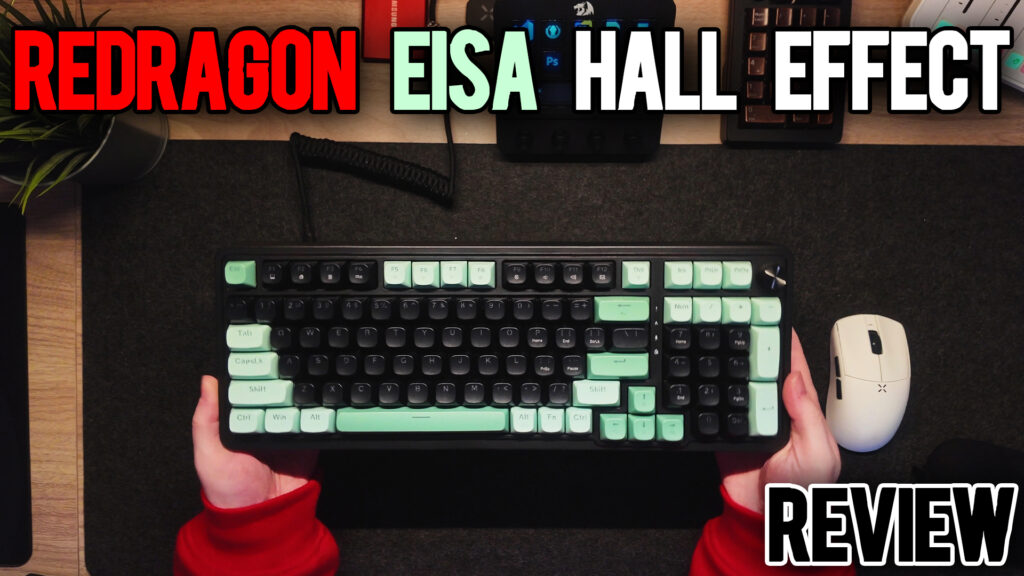
The EISA K686 HE is a classic 96 percent layout. You get almost everything from a full size board – function row, arrow cluster, navigation keys, numpad – but squeezed into a shorter footprint that fits better on a normal desk.
The case is entirely plastic. That sounds like a downgrade, but Redragon leans into it in a smart way. The board has a gentle typing angle, big rubber pads on the bottom, and dual stage flip out feet. The large feet lock in nicely. The smaller ones are easier to collapse, so if you tend to shove your keyboard out of the way to eat at your desk, you will want the big feet out.
The colorway is one of the more charming parts of the board. Mint and charcoal keycaps with a bit of dark purple on the edges give it a playful but clean look. It feels more “fun office” than “aggressive gamer.” On a black desk mat with a simple mouse you get a setup that reads as intentional rather than loud.
There is one big design choice that will bother some people. The USB C port lives on the side. Redragon includes a right angle cable that works fine, but if you are left handed with your mouse, or you like thick coiled cables, the side port placement can get in the way.
Also, this is a wired only board. No Bluetooth, no 2.4 GHz dongle. If you need wireless, this is not the one.
Keycaps and Layout
Redragon uses round PBT keycaps with a slightly scooped top. They feel good, with a soft texture that will not immediately shine up. Legends are clear and large with secondary functions clearly printed, which makes life easier if you actually use media keys or shortcuts.
The layout itself is straightforward. No strange key position, no weird function layers for essential keys. If you are coming from a standard full size or 96 percent, you will feel at home quickly. For programmers there is one missing key you may notice, but most people will adapt without much thought.
Indicator LEDs for caps lock, num lock, and other states live above the navigation area. They are simple, clear, and do not try to be clever.
Switches and Typing Feel
Under the keycaps you get Redragon’s “UltraMag palm silky” magnetic switches. Awkward name, surprisingly nice result.
These are linear magnetic switches tuned to be smooth and consistent. There is dampening baked into the design, which you can feel under your fingers and hear in the sound profile. It feels like there are tiny O rings or internal bumpers on the stems. Bottom out is cushioned without turning the board into a mushy mess.
Typing on the EISA is a marbly clacky experience. It is not deep and thocky like a heavily modded custom, but it also is not the hollow clatter some plastic Hall Effect boards suffer from. The two layers of internal dampening do real work here, calming down case ping and keeping the tone focused.
Stabilizers are surprisingly competent. Spacebar, enter, and shift are all reasonably balanced with no wild rattle. You can still tell this is a budget board if you listen for it, but you will not feel an immediate need to crack it open and rework everything before touching another key.
For long typing sessions the combination of the gentle angle, soft bottom out, and mid weight linear feel works well. This is a board you can use to write emails and reports during the day without feeling like you are beating up your fingers.
Sound Profile

Out of the box, the EISA lands in that satisfying clack zone that a lot of people chase with mods.
It is not whisper quiet. If you are in a shared office with people who hate keyboard noise, you will still want something more damped or with silent switches. But compared to a lot of competing Hall Effect boards, especially in this price bracket, the EISA sounds controlled and intentional.
Modifiers sound especially good. They have a nice pop without extra harshness. The internal dampening cuts down on harsh overtones, so even aggressive typing does not get shrill.
RGB does not dominate the sound or the look. LEDs are there if you want them, but the legends are easy to read even with the lighting low.
RGB and Lighting
RGB on this board is fine, not spectacular. The lighting is there, it has multiple effects, and you can go full disco if you really want to, but the LEDs are not super bright and the keycap design does not push light in your face.
Where it gets interesting is in the software. You get per key RGB control in the web app, which means you can actually build a clean, subtle layout for work or a full rainbow mess for late night gaming, and swap between them with profiles.
If you want your board to double as ambient room lighting, this is not the one. If you prefer your RGB to be a subtle accent instead of a spotlight, it works.
Software and Hall Effect Features
Here is where Redragon surprised me.
The EISA K686 HE uses a web based configuration tool. You grant browser access, pick the board, and you are greeted with a clean layout view and four profiles, including a default that you can always fall back to.
From there you can:
- Remap any key
- Configure lighting by effect, zone, or per key
- Adjust global polling rate from 1K up to 8K
- Set rapid trigger behavior
- Tune actuation points per key
- Configure reset points separately from actuation
- Set SOCD behavior
- Create macros and key combos
- Rebind the knob for volume, media control, or custom actions
Functionally it has everything you would expect from a modern Hall Effect board. The main critique is organization. Some options live under lighting, some under key settings, some under a dedicated SOCD tab. It all works, but you will spend a few minutes clicking around the first time you use it.
The upside is that once you have a profile dialed in, it sticks. Rapid trigger works as expected, and per key actuation tuning lets you set ultra light triggers on movement keys and a more normal feel on your typing keys.
Gaming Performance
This board is built for gaming and it behaves that way.
At 8K polling with rapid trigger enabled, movement in shooters feels snappy and responsive. Feather tap to start moving, feather release to stop. It will not magically make you a pro, but you are not going to be fighting your keyboard in fast titles.
Key rollover and input handling behave as they should. No weird ghosting in WASD heavy games, even when spamming multiple keys and modifiers.
The beauty of the 96 percent layout shows up in games too. You get a full numpad for macros and commands in MMOs or sims while still keeping your mouse hand relatively close. For single PC streaming or content creation, having the knob and numpad together is great for quick shortcuts.
Everyday Work Use
Hall Effect boards often feel like gamer toys first and work tools second. The EISA manages to do both.
For normal office work the board is comfortable. The sound profile sits in a reasonable range. You are not going to sneak this into a silent library, but in a home office or a normal work setting it should not be a problem.
The ability to build a “work” profile with calmer lighting and more standard actuation, then switch to a “game” profile with more aggressive rapid trigger behavior, is a big plus.
The only thing that holds it back for pure office users is the wired only nature and that side USB C port. If your desk routing works with that, you are fine. If not, you may find yourself a little annoyed.
Pros and Cons
Pros
- Affordable Hall Effect board with rapid trigger and 8K polling
- 96 percent layout gives you most of a full size in a smaller footprint
- Smooth UltraMag magnetic switches with built in dampening
- Surprisingly good sound profile for an all plastic case
- Two internal dampening layers tame hollowness and ping
- Solid stabilizers for the price
- Web based software with per key actuation, rapid trigger, macros, and per key RGB
- Knob with click and full remapping
- Hot swappable magnetic switches with extras in the box
- Big rubber pads and dual stage feet keep the board stable
- Colorway looks clean on camera and on the desk
Cons
- Wired only – no Bluetooth or 2.4 GHz
- Side mounted USB C port is awkward with some desk layouts and custom cables
- RGB is on the dimmer side
- Software is powerful but options are scattered in different tabs
- Small flip out feet collapse more easily than the large ones
- Not the quietest board for shared ultra quiet spaces
Who Is This For
The Redragon EISA K686 HE is for people who are Hall Effect curious but do not want a tiny gamer board or a giant price tag.
If you:
- Want rapid trigger for shooters
- Still need a numpad for work
- Care more about feel and sound than “premium” materials
- Are fine with wired only
then this is a strong contender.
If you absolutely need wireless, hate side USB ports, or want a super deep thock out of the box, you will want to look elsewhere.
Final Thoughts
Redragon has a reputation for budget gear that gets the job done with a few caveats. The EISA K686 HE still has a couple of those caveats, but for once the list of positives clearly outweighs them.
You get a 96 percent Hall Effect board with a good sound profile, comfortable switches, full rapid trigger feature set, and a knob, at a price that undercuts most of the competition.
No, it is not going to replace a high end custom or a flagship Wooting for hardcore enthusiasts. It does not need to. It is the board that lets more people try Hall Effect and rapid trigger on a layout that actually fits how they work and play.
For a wired budget board, it is an easy one to recommend.