Chilkey SF60 Review: A Bold Hall Effect Keyboard That Wants To Challenge Wooting
The Hall Effect keyboard market has become one of the most competitive spaces in gaming peripherals. A few years ago, magnetic switch keyboards felt niche. Now, every brand wants a piece of the rapid trigger, adjustable actuation, SOCD, analog-style gaming keyboard category. That makes the Chilkey SF60 especially interesting because this is not just another generic 60% gaming keyboard. It feels like Chilkey is trying to make a direct statement.
The Chilkey SF60 is a compact 60% Hall Effect gaming keyboard with a strong visual identity, an aluminum-heavy build, metal-style keycaps, bright RGB, magnetic switch performance, and a feature set clearly aimed at the same audience looking at the Wooting 60HE and Wooting 60HE V2. It is not hiding what it wants to compete with. The size, the feature set, the performance pitch, and the pricing all put it in that same conversation.
That is both the best and worst thing about this keyboard.
On its own, the Chilkey SF60 is an interesting, unique, high-performance Hall Effect board. It looks different, sounds different, and feels more premium than many budget magnetic switch keyboards. But once it enters Wooting territory, the expectations change. At that point, being good is not enough. The software has to be excellent. The hardware has to justify itself. The typing experience has to feel distinct in a good way. The price has to make sense. The ecosystem has to feel trustworthy.
That is where the Chilkey SF60 becomes complicated.
A Strong First Impression
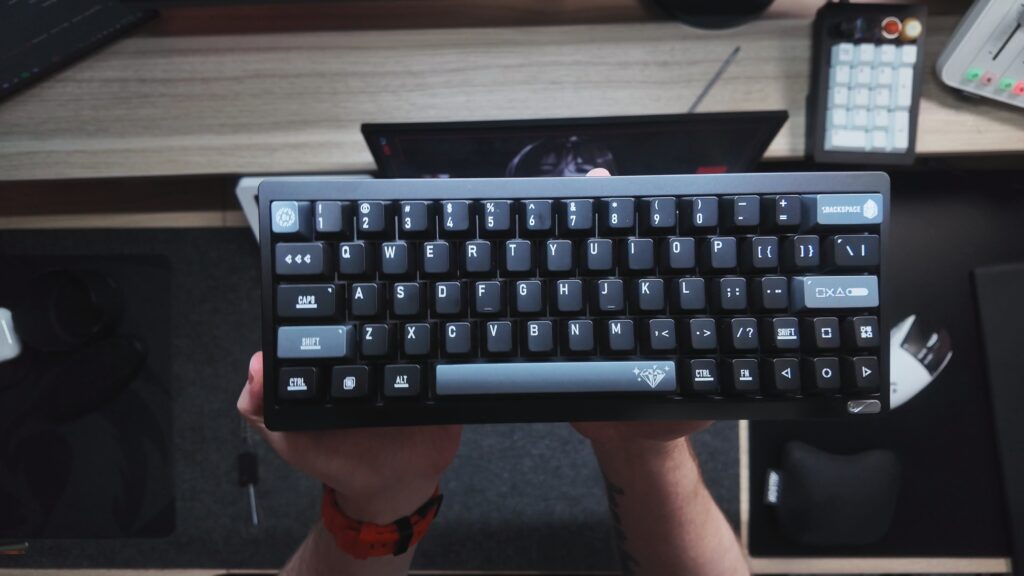
The first thing Chilkey gets right is presentation. The box looks good, the keyboard feels premium when it comes out, and the board immediately gives off the impression that this is not a cheap throwaway 60% keyboard. The SF60 has an aluminum chassis and a very distinct design language. It looks aggressive, angular, and gaming-focused without falling into the usual plastic gamer keyboard look.
The black finish is especially sleek. It gives the board a sharp, almost futuristic appearance. There is a bit of a Transformer-like aesthetic here, especially with the front slope and diamond-shaped design accents. That will be polarizing. Some people are going to love it because it looks different. Others may feel like it is over-designed compared to the cleaner, more modular look of something like the Wooting 60HE V2.
That is a recurring theme with this keyboard. Chilkey made choices. Not everyone will agree with them, but at least the SF60 does not feel anonymous.
What Comes in the Box
Inside the box, you get the keyboard, a manual, a braided cable, and a keycap puller. That is mostly fine, but there is one omission that stands out: no extra switches.
At this price point, extra switches should be included. Even lower-priced keyboards often include spare switches now, and for a Hall Effect board where switches are part of the appeal, it feels like a missed opportunity. It may not ruin the experience, but it does affect the overall value perception. When a keyboard is priced close to the strongest names in the Hall Effect space, the small details matter.
The included cable is nice enough, and the accessories are functional, but the lack of extra switches makes the unboxing feel less complete than it should.
Aluminum Keycaps Are the Big Differentiator
The most unusual part of the Chilkey SF60 is the keycap setup. These are not standard plastic keycaps. The board uses aluminum-style keycaps with a plastic inner layer. That combination is important because full heavy metal keycaps can interfere with feel, weight, sound, and potentially switch behavior depending on the implementation. Chilkey’s approach keeps the keycaps lighter while still giving them that metallic top feel and unique sound signature.
The result is a keyboard that does not sound like most Hall Effect keyboards. The SF60 has a loud, resonant, metallic sound. It is not just “thocky” in the usual enthusiast sense. It has a sharper and more echoey character because the keycaps amplify the sound more than normal PBT keycaps would.
Some people are going to love that. It gives the board personality. It makes the SF60 feel different from the sea of foam-filled, muted, creamy prebuilt keyboards. But this is not a quiet keyboard. It is loud in person. The sound carries. If you live with other people, stream with a sensitive microphone, work in a shared space, or prefer a softer typing profile, this may be too much.
The spacebar is more controlled than expected, and the stabilizers do not seem to have the kind of rattle that ruins a sound test. That is a win. But the overall sound profile is still aggressive. The metal keycaps are not a subtle upgrade. They are the identity of the keyboard.
Fixed Typing Angle and Design Choices
The SF60 also has a fixed typing and gaming angle. There are no adjustable feet like you would find on many other boards. That means you either like the angle or you do not. There is no real way to tune it to your preference out of the box.
This is another bold decision. For some people, the built-in angle may feel natural and comfortable. For others, it could be a problem during longer typing or gaming sessions. A fixed angle is not automatically bad, but it does reduce flexibility. On a gaming board, especially one competing in a premium space, adjustability matters.
The design itself also makes some strong visual statements. The front slope and diamond accent give the keyboard character, but they may not appeal to everyone. Compared with cleaner designs, the SF60 feels more stylized. That may be exactly why some buyers choose it, but it may also be why others avoid it.
Wired Only, Built for Gaming
The Chilkey SF60 is a wired keyboard, which makes sense for its target audience. This is a gaming-focused Hall Effect board, and for competitive gaming, wired performance is still the expectation for many players. There is no wireless mode here, and that likely will not bother the intended buyer.
The 60% layout is also very gaming-focused. You get a compact footprint, more mouse room, and a minimal desk setup. For FPS players, that can be a major advantage. For productivity, editing, writing, or general desktop use, the lack of dedicated arrow keys, function row, and navigation cluster may be less appealing.
The board does include some nice visual details, including accent legends, underlined design elements, and a clean directional cluster treatment. The legends and decorative touches help the keyboard feel less generic.
Gaming Performance Is Strong
Performance is where the Chilkey SF60 does well. In actual gaming, it feels fast, responsive, and capable. The Hall Effect implementation gives you the expected magnetic switch advantages: adjustable actuation, fast reset behavior, and features aimed at competitive input control.
In the video, gaming performance does not appear to be the problem. The board works well, the switches feel excellent, and there are no major performance issues during gameplay. That matters because a Hall Effect keyboard can look great and sound interesting, but if it does not perform, it fails at its main purpose.
The SF60 performs. That is not the issue.
The issue is whether it performs in a way that makes it worth choosing over the current leaders in the space.
The Poseidon Switches Might Be Chilkey’s Biggest Win
The most impressive part of the Chilkey SF60 may not actually be the aluminum chassis, the RGB, the design, or even the metal keycaps. It may be the Poseidon switches.
These are some of the best Hall Effect switches I have ever used in any magnetic switch keyboard. That is not a small statement, because Hall Effect keyboards have improved dramatically over the last few years. The gaming performance has gotten faster, the software has gotten more advanced, and the switch feel has become smoother across the board. But even with all of that progress, many Hall Effect switches still do not feel quite like traditional mechanical switches.
That is where the Poseidons stand out.
The Poseidon switches feel closer to a mechanical keyboard than most Hall Effect switches I have tested. They still give you the benefits that make magnetic switches appealing: adjustable actuation, rapid trigger-style response, fast reset behavior, and strong gaming performance. But they do not feel as sterile or disconnected as some Hall Effect switches can. There is a more natural feel to them. They feel smoother, more grounded, and more satisfying during normal typing.
That matters because a lot of Hall Effect boards are excellent for gaming but less exciting for everyday typing. The Poseidon switches help close that gap. They make the SF60 feel less like a pure gaming device and more like a keyboard you could actually enjoy using outside of games.
This is also why the switch pricing is frustrating. The Poseidons are good enough that Chilkey could have a real winner if they made them easier to buy separately at a more competitive price. These switches may be the strongest part of Chilkey’s Hall Effect lineup, and they deserve more attention than they are probably going to get if people only focus on the SF60 versus Wooting comparison.
The SF60 as a complete keyboard has some complicated tradeoffs. The software needs work. The price is tough. The design is polarizing. But the Poseidon switches themselves are excellent. If Chilkey can build around those switches more effectively, or sell them separately at a better price, they could have something genuinely special in the Hall Effect space.
Software Is the Weakest Part
Hall Effect keyboards live and die by software. The hardware matters, but the software is what lets you tune actuation, rapid trigger behavior, SOCD-style controls, DKS, macros, lighting, profiles, calibration, and advanced input behavior. A magnetic switch keyboard with bad software feels unfinished, even if the hardware is good.
The Chilkey SF60 software has the features you would expect, but the experience is not as polished as it needs to be. It appears to be a reskinned software platform rather than something built from the ground up specifically for this board. That shows in the interface.
There are fonts that do not match. There are links in multiple places. Some sections feel unintuitive. Advanced features are present, but not always explained clearly. The software can feel cluttered, and navigating it is not as smooth as it should be.
The board includes advanced functions such as SOCD, MT, DKS, TGL, MP, macros, lighting controls, configuration storage, switch settings, dead zone options, trigger settings, calibration, and firmware updates. That is all good. The problem is not that the software lacks features. The problem is that the software does not present those features as clearly as Wooting does.
That is a serious problem when Wooting is the obvious comparison.
The Warranty Activation Screen Is Strange
One of the oddest parts of the software experience is the warranty activation requirement. When setting up the board for the first time, the software requires activation of the board and starts the five-year warranty before allowing access.
A five-year warranty sounds great, but forcing activation before proper use raises questions. What happens if someone tests the board and returns it? What happens with a second owner? Does the warranty reset? Does it transfer? How does the system handle open-box products?
The answers may exist somewhere, but the experience itself feels unusual. A keyboard should not make the user think this much before they can even get into the software and start using the product.
RGB Is a Highlight
The RGB on the Chilkey SF60 is genuinely strong. It is bright, clean, and includes per-key customization. The software allows you to paint lighting across the keyboard, which is exactly how per-key RGB should work. That kind of direct control makes customization much easier.
There is also a rear RGB strip, which adds personality to the board. It may not be visible from the front in every setup, but it gives the SF60 more visual presence on the desk. RGB in unusual places can be fun when it is done cleanly, and this is one of the areas where the board feels more playful.
For users who care about setup aesthetics, lighting, desk visuals, and customization, the SF60 scores points here.
Sound Test: Loud, Metallic, and Polarizing
The SF60’s sound profile is one of the biggest reasons to either buy or avoid it. This keyboard is loud. The aluminum-style keycaps create more resonance than typical PBT keycaps, and the result is a much more pronounced typing sound.
It is not a bad sound. It is controlled enough to be interesting, and the lack of stabilizer rattle helps. But it is not soft, quiet, or understated. It is a keyboard with presence.
The best way to describe the sound is metallic, resonant, and thick. It has a unique character that you do not hear from most prebuilt Hall Effect boards. That makes it memorable, but it also means it will not be for everyone.
If you want a quiet gaming keyboard, this is probably not the one. If you want a keyboard that sounds distinct and does not blend into every other prebuilt on the market, the SF60 has a real argument.
Chilkey SF60 vs Wooting 60HE V2
This is the comparison that defines the entire review.
The Chilkey SF60 performs well. It has strong switches, a premium-feeling build, aluminum-style keycaps, great RGB, and a unique look. Those are all legitimate strengths.
But Wooting has the software advantage. Wooting also has a more mature ecosystem, stronger long-term update confidence, and with the Wooting 60HE V2, a more modern and modular design direction. Features like easier case access, better modding paths, and cleaner software matter a lot in this category.
The SF60 feels closer to a strong first-generation Wooting-style competitor, while Wooting has already moved forward. That does not make the SF60 bad, but it puts the board in a difficult position. If the price were lower, the conversation would be easier. At a similar price, buyers are going to ask: why not just get the Wooting?
That is the hardest question for the Chilkey SF60 to answer.
What Chilkey Gets Right
The SF60 has several real strengths. The build quality feels premium. The design is unique. The RGB is bright and customizable. The switches feel excellent. Gaming performance is strong. The sound profile is different from most Hall Effect boards. The aluminum-style keycaps give it a clear identity.
That matters. A lot of gaming keyboards feel like copies of each other. The SF60 at least tries to stand out.
Where Chilkey Needs Improvement
The biggest improvement area is software. It does not need fewer features. It needs better organization, better explanations, cleaner UI design, and a more user-friendly flow. Hall Effect software should make advanced features feel accessible, not confusing.
The price is also an issue. At the price discussed in the video, the SF60 is too close to Wooting territory. A lower price would make the board much easier to recommend because the unique hardware would feel like a better value.
The lack of extra switches in the box should also be fixed. For a keyboard at this level, spare switches should be included.
The fixed typing angle may be fine for some users, but adjustable feet would make the board more flexible. The design is also polarizing, which is not exactly a flaw, but it does narrow the audience.
Pros and Cons
Pros
Strong Hall Effect gaming performance
Poseidon switches are some of the best Hall Effect switches I have ever used
Closest Hall Effect switch feel to a traditional mechanical keyboard experience
Excellent switch smoothness and responsiveness
Unique aluminum-style keycaps
Premium-feeling aluminum chassis
Bright per-key RGB
Rear RGB strip adds personality
Distinctive design language
Good stabilizer behavior with no obvious rattle
Advanced software features are present
Firmware update process appears smooth
A real alternative for people who want something different from Wooting
Cons
Software is confusing and less polished than Wooting
Price puts it directly against stronger competition
No extra switches included in the box
Very loud sound profile will not suit everyone
Fixed typing angle limits adjustability
Design is polarizing
Warranty activation requirement feels odd
Not wireless
Hard to justify over Wooting unless you specifically want the design, keycaps, or sound
Final Verdict
The Chilkey SF60 is a good keyboard in a difficult position.
It performs well, feels premium, sounds unique, and brings some bold ideas to the Hall Effect keyboard market. The aluminum-style keycaps are the biggest differentiator, and they give the board a sound and feel that immediately separates it from more typical gaming keyboards. The RGB is strong, the switches feel excellent, and the board does what it needs to do in games.
But the SF60 is competing against Wooting, and that is a hard fight. Wooting’s software, ecosystem, and design maturity make it difficult for a new challenger to win on performance alone. The Chilkey SF60 needs either a clearer price advantage, better software, or a more obvious reason to choose it over the Wooting 60HE V2.
For someone who wants a loud, metal-keycap, aggressive-looking 60% Hall Effect keyboard, the Chilkey SF60 could be a great fit. For someone who wants the safest overall competitive gaming keyboard purchase, Wooting is still the easier recommendation.
The SF60 is not bad. It is actually a strong entry. But at this price, it needs to be more than strong. It needs to answer the question: why this instead of Wooting?
Right now, the answer depends heavily on whether you love the design, the metal keycaps, and the sound profile. If you do, the Chilkey SF60 has something to offer. If you do not, Wooting remains the board to beat.