Yunzii RT75 PRO Review: The 2.4GHz 8K Dongle Is the Whole Point

If you’re shopping the Yunzii RT75 PRO, I think you should be honest about why you’re here.
You’re here for the 2.4GHz 8K dongle.
Not for the warm-and-cozy “office thock.” Not for the “I’m going to hand-lube 90 switches and tune stabilizers for three nights straight” lifestyle. This is a board that’s clearly trying to be a wireless gaming-first keyboard, and when you judge it by that standard, it makes a lot more sense.
If you just want to jump to links: the Yunzii RT75 PRO on Amazon is here: https://amzn.to/4qBzvRu, and the direct link is here: https://www.yunzii.com/TRISTANPOPECRAFTINGWORLDS. If you’re already thinking about converting this into more of a daily-driver typing board, you’ll probably end up looking at switch swaps like GEON RAW switches: https://amzn.to/3NHdkLa.
Now let’s talk about what the RT75 PRO gets right, what annoyed me, and who I think should actually buy it.
The RT75 PRO’s identity is “wireless gamer board”
The RT75 PRO feels like it was designed around a very specific use case:
- Turn off (or tame) the RGB
- Plug in the 2.4GHz 8K dongle
- Max battery life
- Game wirelessly
That’s the vibe. And honestly, it’s a good vibe.
A lot of keyboards try to be everything and end up being kind of nothing. The RT75 PRO has a clear lane. If you’re a wireless gamer who doesn’t want to think too hard about setup once it’s dialed in, this is the pitch.
And it’s a pitch that works… with two big caveats.
The 2.4GHz 8K dongle is the headline feature
This is the reason the RT75 PRO is interesting.
People get stuck in old thinking about wireless keyboards, like wireless automatically means compromise. That used to be fair. It’s not always fair anymore, and the whole point of an 8K dongle is to show up with “serious gamer energy” instead of “couch keyboard energy.”
If you’re buying the RT75 PRO, I think you’re buying it for that experience. If you’re not, you may end up in a weird spot where the keyboard is “fine,” but not necessarily the best value for your personal needs.
If you want the RT75 PRO specifically for that wireless gaming setup, you can grab it on Amazon here: https://amzn.to/4qBzvRu or direct here: https://www.yunzii.com/TRISTANPOPECRAFTINGWORLDS.
Sound test reality: the number row sounds different

This is the thing that bugged me the most, because it’s not subtle.
Even in the sound test, you can hear a difference between the number row and the rest of the keys. Something is off up there. It doesn’t feel like a “you’re being picky” situation. It’s a “once you hear it, you can’t unhear it” situation.
My best guess is something like internal dampening being a bit too thick in that top section, or the way the internal stack is laid out near the top is changing the acoustics. I’m not going to pretend I know the exact cause without tearing it apart and measuring everything, but I can tell you the effect: the top row has a different character than the rest of the board.
Will everyone care? No.
Will the people who watch sound tests, buy based on sound, and obsess over consistency care? Yep. That’s the crowd that’s going to notice and feel mildly haunted every time they hit the top row.
Software issues: annoying, but fixable
The other issue is the software. We ran into problems.
Here’s the good news: software is one of the easiest things for a company to fix if they actually keep up with updates. Hardware issues can turn into permanent quirks. Software issues can be cleaned up with a patch and everyone moves on.
So this is my simple request to Yunzii:
Please update it. You’re usually decent about keeping up with this stuff. Fix it.
If they do, it immediately improves the ownership experience, because gamer boards live and die by how “smooth” the whole setup feels.
RGB and south-facing placement: practical, not obnoxious
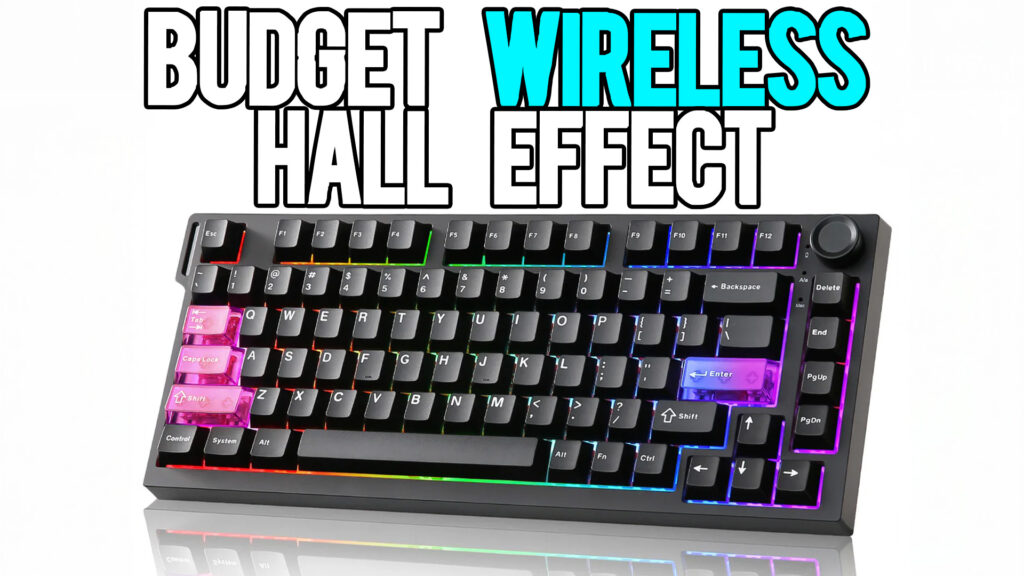
RGB on the RT75 PRO is in a good place.
It’s bright enough to look good in a dark room, and it’s still visible with the lights on. It’s not the most nuclear RGB I’ve ever seen, but I also don’t think this keyboard is trying to be an RGB flashlight that blinds you from orbit.
What matters more to me is the placement and the vibe.
I’ve used boards where the RGB is positioned in a way that it shines straight into your eyes through the caps and it becomes distracting. The RT75 PRO avoids that problem.
Also, it’s got south-facing RGB, which matters if you’re the kind of person who likes experimenting with keycaps. South-facing generally means you’ve got more flexibility without weird interference issues, and that’s always a win.
The RT75 PRO is a gamer board first, productivity second
This is where I’m going to be blunt: I think the RT75 PRO is a gaming board.
Yes, it has an extra row of keys that can be useful for productivity. But if your main goal is writing, spreadsheets, long email days, and comfort typing, you may end up thinking about switch swaps pretty quickly.
That’s not a bad thing, but it changes the math.
If you start turning this into a “productivity daily driver,” you’re probably looking at switches like GEON RAW (linked here): https://amzn.to/3NHdkLa
And once you start doing that, you can creep into a higher price bracket where other boards exist that already ship with switches that feel better for productivity out of the box.
So the RT75 PRO makes the most sense when you buy it for what it wants to be:
A wireless gamer board with a strong 2.4GHz feature set.
Value and pricing thoughts
I do think the pricing is competitive for what it’s aiming at, especially with that dongle as a key selling point.
But here’s the honest buyer logic:
- If you’re keeping it in its gamer lane, it’s a solid value.
- If you’re immediately planning to swap switches and chase a different typing feel, the total cost can climb fast, and you should compare against other boards that are already “typing-friendly” stock.
If you want the RT75 PRO for the intended use, the easiest path is still the product page itself:
Who should buy the Yunzii RT75 PRO
Buy it if:
- You want a wireless gaming keyboard with a 2.4GHz 8K dongle setup
- You like the idea of a keyboard that’s meant to be used wirelessly, not “wireless as an afterthought”
- You want solid RGB that looks good without being obnoxious
- You’re okay with the idea that software might need updates to get fully polished
Think twice if:
- You’re highly sensitive to sound consistency across the entire board (the number row difference might drive you nuts)
- You hate dealing with software quirks, even temporarily
- You’re primarily shopping for a productivity board and don’t want to spend extra on switch swaps (like GEON RAW: https://amzn.to/3NHdkLa)
Pros and cons
Pros
- 2.4GHz 8K dongle is the star of the show
- Feels like a true wireless gaming-first board
- RGB is solid and not distracting
- South-facing RGB helps with keycap flexibility
Cons
- Number row sounds noticeably different than the rest of the keyboard
- Software issues need to be cleaned up with updates
- If you want it for productivity, you may end up spending extra on switches (example: GEON RAW: https://amzn.to/3NHdkLa)
Final verdict
The Yunzii RT75 PRO is not trying to be your cozy office typing companion. It’s trying to be a wireless gamer board built around a 2.4GHz 8K dongle, and that’s exactly how you should judge it.
Fix the software. Investigate the number row sound difference. If Yunzii tightens those two things up, the RT75 PRO becomes a much easier recommendation for the audience it’s clearly targeting.
If you’re shopping it for wireless gaming, here are the links again where they matter most:
- Yunzii RT75 PRO (Amazon): https://amzn.to/4qBzvRu
- Yunzii RT75 PRO (Direct): https://www.yunzii.com/TRISTANPOPECRAFTINGWORLDS
- GEON RAW switches (if you want to “productivity swap”): https://amzn.to/3NHdkLa