Mechlands Vibe 108 Review: A Full-Size “Budget Monster” That Actually Makes Sense

I’m always a little suspicious of full-size mechanical keyboards under $100.
Not because it’s impossible, but because the checklist usually goes like this: the layout is fine, the switches are okay-ish, the stabilizers are questionable, the case sounds hollow, and the wireless mode feels like a bonus feature that nobody bothered to finish polishing.
So when Mechlands sent the Vibe 108, I expected a “good enough” experience. What I got instead was a keyboard that clearly knows who it’s for: people who want a full-size productivity board, with real convenience features, and a price that doesn’t feel like a dare.
If you want to check it out, here’s the link I used:
Mechlands Vibe 108 (Affiliate): https://www.mechlands.com/products/mechlands-vibe108?sca_ref=8040342.kTcOD8IT6F
First Impressions: The Box, The Look, The “Wait… This Is Actually Clean”
Right away, the packaging has this playful vibe. It genuinely reminded me of something like Splatoon, bright and modern without trying too hard.
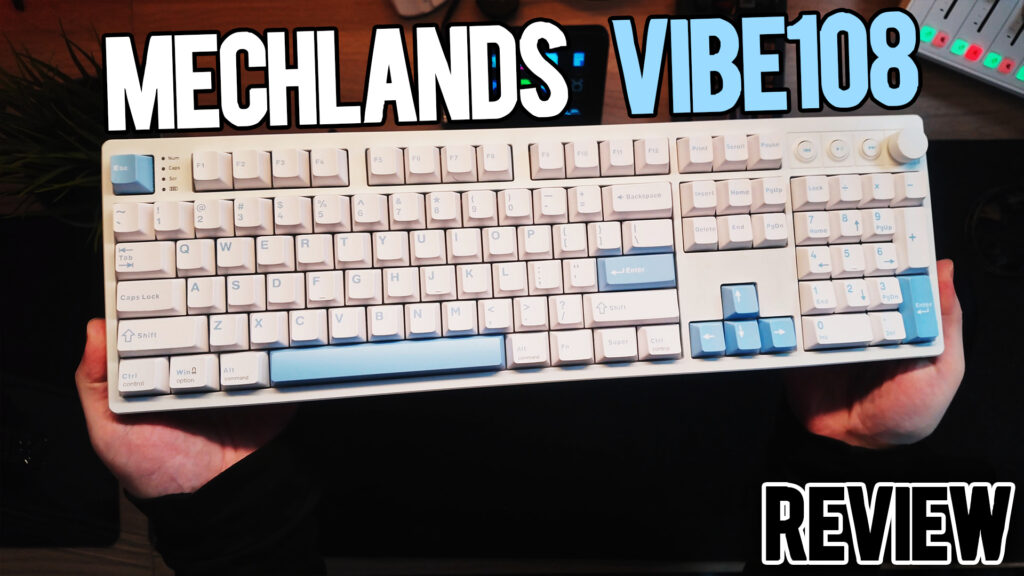
Then you pull the board out and it hits you: this is a clean white-and-blue aesthetic that looks like it belongs in a nice office setup, a dorm desk, or a content creator’s workbench. It’s not screaming gamer, but it’s also not boring.
And the best surprise: for a full-size keyboard, it feels pretty compact once it’s actually on the desk. Full-size layouts can feel like aircraft carriers sometimes. This one doesn’t.
What’s In The Box (and yes, it includes the grandma cover)
Mechlands usually does a decent job with accessories, and the Vibe 108 keeps that trend going:
- A braided white USB to USB-C cable that actually matches the keyboard
- A keycap puller
- Extra switches (thank you, because switches break and life happens)
- And yes, the plastic dust cover, aka the grandma cover
Whether you love it or hate it, it’s included.
Layout and Controls: The Productivity Personality Is Real
This is the part where the Vibe 108 starts showing why it exists.
You get:
- A full-size layout with a number pad (obviously)
- Dedicated media buttons including back/forward style controls
- A volume knob that feels responsive and satisfying
- Indicator lights for your locks and battery status
I’m a sucker for media controls. I used them constantly on my old Logitech board before I fully fell into the mechanical keyboard rabbit hole. Having them back on a budget full-size board is genuinely nice.
Tri-Mode Connectivity + Mac/Windows Toggle (Love This)
Connectivity is one of those things that budget boards often mess up.
Not here.
On the back you’ve got:
- USB-C centered (nice placement)
- Toggle for Bluetooth, 2.4GHz, and wired
- A physical Mac/Windows switch
That last part matters more than people think. No weird key combos. No guessing. Just flip it and go.
Typing Feel: The Silent Switch Version Is Quiet Quiet

The version I tested came with silent switches, and it’s legitimately one of those boards where the loudest part is not the keyboard, it’s your fingers.
If you type with fingernails, you’ll hear your nails.
If you type heavy-handed, you’ll hear your fingers.
The keyboard itself stays polite.
And what surprised me most is it still has a nice bounce-back. Sometimes silent boards feel mushy. This one did not.
Now personally, I prefer a little feedback and sound, so if I were buying this myself, I’d probably choose the Creamy Mint option just to bring some life into the typing experience. I’ve reviewed those mint-style switches before and they can sound great, especially in a case with decent dampening.
Sound Profile: Silent Means SILENT
If you’re shopping for a board that won’t:
- wake up a baby
- annoy coworkers
- get you side-eyed in a shared space
- turn your Zoom meeting into a percussion concert
This is the kind of silent that makes sense.
There’s also a lot of dampening here, and yes, some people will say dampening in a silent board is overkill. But the end result is a board that feels controlled and “complete” instead of empty.
RGB: Way Brighter Than I Expected
This is one of those funny moments where you turn on the RGB and go:
Wait… why is this so bright?
Even without shine-through caps, the lighting looks punchy and clean. If RGB matters to you, you’re not getting an afterthought here.
Software: Web-Based, Convenient… and Weirdly Tiny
This board is not VIA or QMK. It’s software-driven through Mechlands/Mechan’s system.
Good news:
- It’s web-based, so you’re not digging through sketchy downloads
- You can set lighting, remap keys, set macros, and use profiles
Bad news:
- The UI is tiny, especially on a 4K monitor
- Some Hall Effect style settings show up even though this is not a Hall Effect board, which can confuse people
- I could not find a way to rebind the knob, which is a bummer
This is where the Vibe 108 shows the cost-cutting. The hardware is strong for the price. The software is functional, but not premium.
Gaming and Performance Notes
Would I buy the silent version for gaming? Probably not. Not because it can’t, but because I personally like some feedback.
But technically:
- 1000Hz polling is here
- 2.4GHz gives you that snappier wireless feel
- 10,000mAh battery is massive
So yes, you can game on it. It just feels like it was designed more for work and productivity than competitive sweat sessions.
Pros and Cons
Pros
- Excellent value for a full-size board under $100
- Tri-mode connectivity done right (BT, 2.4GHz, wired)
- Mac/Windows hardware switch is a real win
- Dedicated media controls + knob are genuinely useful
- Very bright RGB for the price
- Silent switch version is truly office-friendly
- Solid typing feel with good bounce
- Hot-swappable with extra switches included
- Massive 10,000mAh battery is wild at this price
Cons
- Software UI is tiny and a little awkward
- Not VIA/QMK, so enthusiasts may bounce off immediately
- Knob does not appear to be remappable
- Only comes in this white/blue colorway
- If you want “character” in typing sound, you’ll likely prefer the mint switch option
Final Verdict: Who Should Buy the Mechlands Vibe 108?
If you want a full-size keyboard for work, want your media controls back, want wireless options that actually work, and you want to keep your budget under control, the Vibe 108 is a strong pick.
It’s not trying to be an enthusiast custom. It’s not pretending to be VIA/QMK. It’s a feature-heavy productivity board with a clean aesthetic, and it hits a price point that full-size boards rarely hit without cutting something important.
If Mechlands improves the software experience and gives us knob remapping in the future, this kind of keyboard becomes even more dangerous.
Affiliate link if you want to check it out:
https://www.mechlands.com/products/mechlands-vibe108?sca_ref=8040342.kTcOD8IT6F